Use this structure to start with surface findings, then go deep: indexation, architecture, performance, links, schema, and security.
An audit is a complete check-up for the behind-the-scenes health of your website. Its main job is to spot technical stuff that might block your site from ranking high in search engines like Google. Picture it as a foundation inspection for a house. You can keep living there when the ground is shaky; however, cracks soon appear. This audit studies your site’s technical “bricks,” testing everything from how fast it loads and how safely it keeps data to how it’s organized and coded. In short, it focuses on behind-the-curtain items, not the words and images you publish. Compared to on-page SEO, the technical audit zeroes in on parts that tell search engines and visitors how to navigate, not what shows in results.
Think of a technical SEO audit as the tune-up your car needs before a big trip. Your rims may shine (great content and backlinks). However, the engine must purr for the ride to be smooth. Deal-breakers like crumbling links, snail-slow pages, or robot roadblocks (search engines) can strand potential customers. When your systems are green and glowing, Google can cruise in and visitors stick around. Consequently, those positive signals tell Google “You rock,” which helps rankings and revenue climb. Therefore, running a solid audit gives you a snapshot of engine performance and a clear checklist of fixes. It also reveals side routes you hadn’t noticed, so your site levels up month after month.
Why a Baseline Audit Matters
An audit is more than squashing bugs; it’s a snapshot of how search engines see your site today. Therefore, you can measure what works and what fails against a clear starting point. As a result, your SEO shifts from patchwork to a smart, informed plan. Instead of “We think it’s fine,” you can say, “Here’s today’s reality,” then decide how to improve tomorrow.
Essential SEO Audit Tools
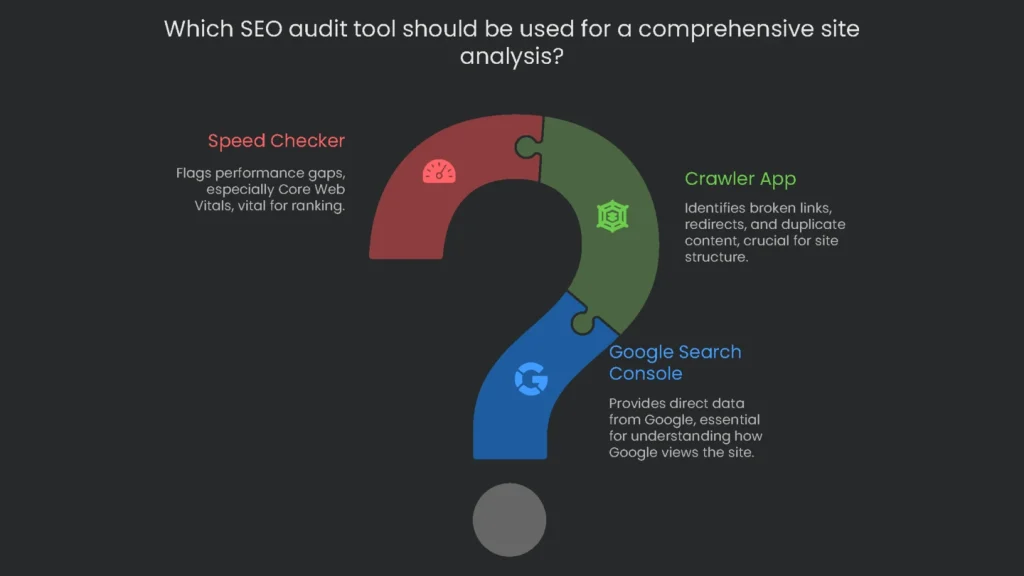
A meaningful audit can’t run on guesses. It needs a toolbox with reliable gadgets. You could grab a dozen programs; however, a focused trio catches most tricky issues.
- The first is Google Search Console (GSC). This free power-up gives you straight data from Google. You’ll see indexing, mobile behavior, Core Web Vitals, and security alerts. Consequently, it’s the clearest mirror of how Google views your site.
- Crawler App (Screaming Frog SEO Spider): Imagine a robot roaming your site and peeking under every page. That’s a crawler. It spots broken links, unreliable redirects, duplicate text, and messy structure. For example, the free version scans up to 500 URLs, which suits small sites.
- Speed Checker: This tool flags performance gaps, especially Core Web Vitals (CWV). Because CWV can affect rankings, checking and boosting them is central to a tech audit.
These three tools will get you far. For a full pro kit, see “Top 10 Technical SEO Tools for 2025.”
How to Run the Audit
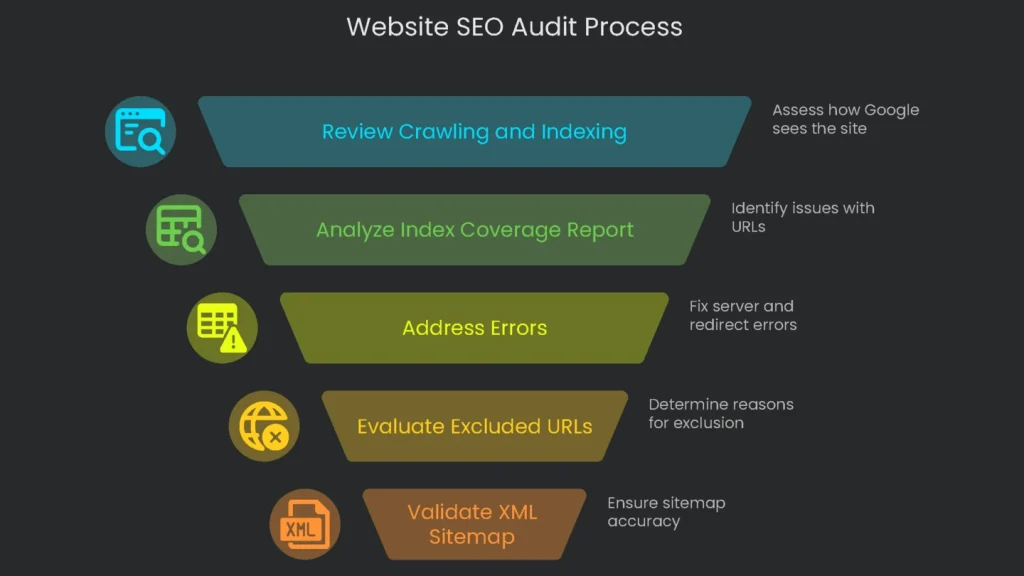
The audit follows a logical flow. Therefore, you can work step by step without getting lost.
Review Crawling and Indexing
Before you dive deep, confirm how Google already sees your site. The best place for that data is Google Search Console.
Using the Index Coverage Report
Open the Index Coverage report in the “Indexing” section. It lists every URL Google knows and its status. Therefore, it’s the best first step to find issues that keep pages out of results. URLs appear in four groups: Error, Valid with warning, Valid, and Excluded.
Breaking Down GSC Statuses
The wording in Index Coverage can be tricky. Therefore, this table explains common labels, what they mean, and how to react.
| Status Name | What It Means and the Cause | What To Do |
| Error (e.g. Server error (5xx), Redirect error) | Google is saying, “we couldn’t open the page, even a little.” This can happen if the server is down, if redirects point to wrong pages, or if the robots.txt is too strict. | Make this your first task. Fix issues here, since Google can’t see the page. |
| Excluded:Crawled – currently not indexed | Google crawled the page, then left it out of the index. This can happen if the page is thin, links to other key pages, or looks a lot like others. | Review content and links first. If the page is valuable, add info, add relevant internal links, and make it unique. |
| Excluded:Discovered – currently not indexed | “This page exists, but Google has not visited yet.” Tight crawl budgets, messy links, or missing internal links can cause this. | If the page needs traffic, link to it from an important page to prompt a crawl. |
| Excluded:Duplicate, Google chose different canonical than user | “You signaled a main page, but we chose another.” Conflicting signals (e.g., links and sitemaps disagree). | Ensure links, sitemaps, and canonicals all point to the same master URL. |
| Excluded:Alternate page with proper canonical tag | “This page has a canonical tag pointing elsewhere, so we skipped it.” The tag is working as intended. | No action needed; the rel=”canonical” is correct. |
| Excluded: Page with redirect | “This link redirects to another URL, so we excluded it.” A 301 or 302 is behaving as it should. | No action needed; the right page receives the traffic. |
| Excluded: Not found (404) | “This page returned ‘Not Found’.” Usually the page was deleted or a broken link points to it. | If it should exist, restore it or update the link. If it was removed, ensure no pages still link to it. |
| Excluded:Blocked by robots.txt | “robots.txt tells us not to crawl this URL.” The file is blocking the page. | Open your file. If the page should be indexed, remove the block. |
Validating Your XML Sitemap
An XML sitemap is a map for Google. It lists the pages you want crawled. Therefore, use the Sitemaps section in Google Search Console to confirm submission and fix errors. Typical problems include bad formatting, robots.txt blocks, or broken links. As a result, you may waste your crawl budget. Make sure the “Discovered URLs” roughly match the important pages you expect.
Deep-Dive Crawl the Whole Site
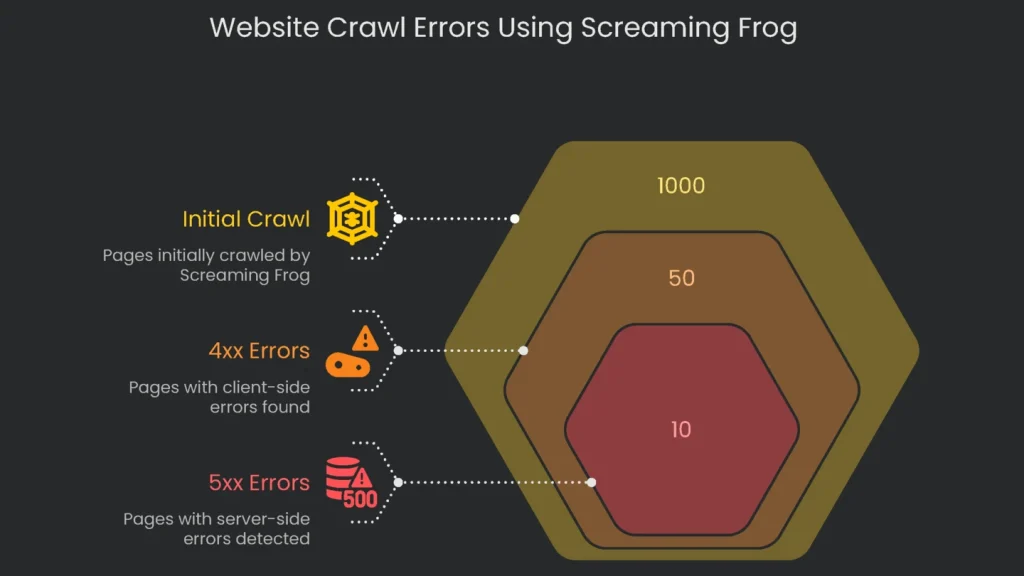
After GSC, crawl the entire site with Screaming Frog SEO Spider. Think of it as a mini search engine that scans key technical signals. Therefore, paste your homepage URL and click “Start.”
Hunting Down Response Codes
When a bot requests a page, the server returns a response code. Scanning these codes is essential in any audit.
- 4xx Client Errors (like 404): Broken links live here. They annoy visitors, interrupt link juice, and waste crawl budget. To find them, open Response Codes > Client Error (4XX) in Screaming Frog. Click a 404, then the “Inlinks” tab to see referrers. Consequently, update the link to the correct URL or remove it so a live page takes the stage.
- 5xx Server Errors: Codes starting with 5 signal server crashes. If Google hits a 5xx, it can’t read the page. Repeated failures may drop it from the index. Therefore, use Response Codes > Server Error (5XX) to spot issues. Fixes usually require a developer to resolve server-side problems.
Optimizing Titles & Metas
A page title is your search headline. If it’s clear and compelling, more people click. Therefore, treat titles and meta descriptions as small ads for your listing. In Screaming Frog, use Page Titles and Meta Descriptions to catch these issues fast:
- Missing: The page exists, but title or description is blank. Search engines need these labels.
- Duplicate: Multiple pages reuse the same title or description. That confuses engines about which page is the authority.
- Over/Under Limit: Titles that are too long get cut; ones too short underperform. Screaming Frog shows character count and pixel width. Consequently, use pixel width to fit Google’s display.
Fixing Redirects & Loops
302s and 301s tell the web when a page moved permanently (301) or temporarily (302). However, bad setups can trip SEO. Watch for redirect chains and loops.
- Redirect Chains: www.site.com/first → /second → /third → /final. Each hop slows users and chips away authority. After 10 hops, Google may return a 404.
- Redirect Loops: A worse fate-an infinite merry-go-round. /v1 → /v2 → /v1 forever.
Screaming Frog helps here. Open Reports > Redirects > Chains and export. Then review the map. Break the chain by pointing the first URL directly to the last. Consequently, users land faster and SEO stays strong.
Checking URL Structure
Keep your URL structure neat and logical. That clarity helps visitors and Google understand each page.
- Descriptive & Readable: Use meaningful words, not IDs or long parameters. For example, “/services/technical-seo-audit” beats “/page.php?id=891.”
- Use Hyphens: Google recommends hyphens between words. They’re clearer than underscores.
- Use Lowercase: URLs can be case-sensitive. Stick to lowercase to avoid duplicate content.
- Avoid Extra Parameters: Tracking parameters spawn near-duplicates. Prefer static URLs. If parameters are needed, handle duplicates with canonical tags or the Parameter tool in GSC.
Break Down Your Site’s Architecture
Site architecture describes how pages are arranged and linked. A smart layout helps users find content quickly. It also routes ranking signals where they matter.
Understanding Site Depth
Crawl depth measures clicks from the homepage to a page. Your most important pages should be three clicks deep or fewer. Pages buried deeper are visited last by users and bots, so they seem less important. Therefore, in Screaming Frog, open the Internal tab and sort by Crawl Depth. Next, surface vital pages that sit too deep.
Architecture & Link Authority
Your layout is a roadmap for link equity. Typically, the homepage starts with the most authority, which flows through internal links. However, pages buried in the hierarchy receive less. If a page isn’t linked at all, it gets zero internal equity. Therefore, mapping structure is user-friendly and strategic. It steers authority to pages that must rank. For visualization, Screaming Frog Spider can create clear architecture maps.
Finding & Fixing Orphan Pages
Orphan pages have zero internal links. Since crawlers move via links, they miss orphans completely. Consequently, such pages are unlikely to be indexed or rank. The solution is simple: add relevant internal links or place the page in navigation or a sitemap. That single link can wake it up and pass equity.
To surface missing URLs, combine data sources and compare them. Screaming Frog’s APIs make this quick.
- In Screaming Frog, connect Google Analytics and Google Search Console at Configuration > API Access.
- Ensure the spider also reads your sitemaps.
- Go to Configuration > Spider > Crawl and check the sitemap box.
- Start the crawl with the main button.
- When finished, open Crawl Analysis and run it.
- Then open the Sitemaps, Analytics, and Search Console tabs. Filter for Orphan URLs.
You’ll see pages that appear in a sitemap or receive visits but didn’t appear in the crawl. For genuine orphans you want indexed, add an internal link from a strong, related page. If a page is outdated, 301 it to a current page or remove it. For visuals and steps, see our tutorial on finding orphan pages.
Check Performance & Core Vitals
Speed and usability matter to search engines. Google uses Core Web Vitals to assess page experience. These are confirmed signals. Therefore, you should monitor them.
Grasping LCP, INP, and CLS
- Largest Contentful Paint (LCP) shows how quickly the main content appears. Aim for ≤ 2.5 seconds.
- Interaction to Next Paint (INP) measures responsiveness after interactions. A good INP is ≤ 200 ms. Since March 2024, it replaced FID.
- Cumulative Layout Shift (CLS) tracks layout movement during load. Keep CLS < 0.1.
Working with PageSpeed Insights
Google’s PageSpeed Insights tool is ideal for checking performance. Don’t stop at the homepage. Instead, test key templates such as services, products, and recent posts. “This URL” shows lab data; “Origin” shows real user data. Rankings rely on field data. However, lab data helps diagnose and test fixes.
Spotting Problems and Solutions
Open “Opportunities” and “Diagnostics.” Most speed issues fall into two buckets. First, a slow Largest Contentful Paint often stems from slow servers, render-blocking resources, or oversized images. Second, a poor Interaction to Next Paint usually comes from long tasks, heavy JavaScript, or third-party scripts tying up the main thread.
- Low CLS problems often come from missing size attributes for images, iframes, and ads; intrusive UI like cookie banners; and late-loading web fonts.
Nail Your Mobile Experience
Since Google moved to indexing mobile versions, a smooth mobile site is essential. It is not optional.
Switch to the Right Testing Tools
On December 1, 2023, Search Console removed the mobile usability report and the standalone Mobile-Friendly Test. However, mobile usability now lives inside broader page experience metrics. Therefore, use Lighthouse via PageSpeed Insights for current checks.
Getting Mobile Checks Done
- PageSpeed Insights: PSI defaults to mobile analysis. It simulates performance, checks Core Web Vitals, and previews the pocket-screen experience.
- Chrome DevTools: Built-in emulation previews many devices. Therefore, you can test video, buttons, and font legibility without extra tools.
- Google’s Rich Results Test: It also crawls from a mobile perspective and flags issues before rich features are considered.
Fix Duplicate Content
When pages blur into the same story, search engines hesitate. Consequently, authority gets diluted. Keep things clear to keep signals strong.
Using a Crawler to Find Duplicates
Screaming Frog will spot copycats for you. Therefore, you won’t need a magnifying glass.
- Exact Duplicates: Go to Content > Exact Duplicates to list perfect mirrors, even down to hex-byte fingerprints. Common causes include wrong link http/https, www choices, or trailing slashes.
- Near Duplicates: Enable Config > Content > Duplicates before crawling. Afterward, use Content > Near Duplicates to catch pages that overlap (default 90%). For example, nearly identical category pages or product listings with tiny differences.
Using the rel=”canonical” Tag
The best way to handle duplicate content is the rel=”canonical” tag. This tiny HTML line goes inside the head of a page and tells search engines which URL to keep. When the bot sees the tag, it consolidates ranking power from duplicates to the master URL. To set it up, add this line on duplicate pages: . Then change the URL to your master page.
But watch out for rookie mistakes that can hurt your SEO:
- Don’t point paginated pages (2, 3, 4) to page 1. Each page should self-canonicalize.
- Always use the full URL, not a relative path.
- Ensure each page has only one canonical tag.
Double-Check Structured Data
What’s Structured Data?
Structured data lets you speak search engines’ language by labeling content with standard types. Usually, you borrow from Schema.org. For example, you can declare “Recipe,” list ingredients, cooking time, and reviews.
Why It’s Key for Rich Results
When structured data is correct, your page can win a rich result. These rich snippets add stars, prices, times, and FAQs. Google doesn’t promise rank boosts. However, the visual upgrade often lifts click-through rate.
Using the Rich Results Test
To check eligibility, run the Rich Results Test at Google. Enter a URL or paste HTML. The tool lists supported results and flags errors or warnings to fix first.
Turning Data into Action
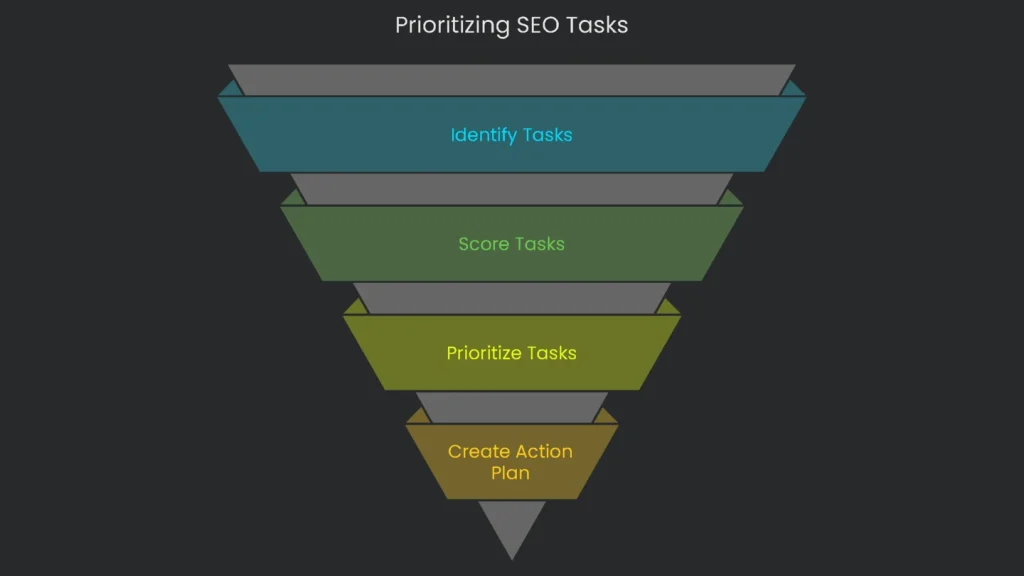
Once you gather results, convert raw data into a clear to-do list. A long error list can overwhelm teams. Therefore, prioritize items so everyone knows what to tackle next.
Using the Impact vs. Effort Matrix
Score each task on two axes. First, Impact asks: will this boost traffic, rankings, or sales a lot? Second, Effort asks: how many developer hours or dollars will it take? Consequently, you’ll highlight high-impact, low-effort fixes first. For a deeper dive, follow the link mentioned above.
Dividing Tasks Into a 2 x 2 Grid for a Simple Plan
A 2×2 grid shows what to do now versus later. It gives SEOs, marketers, and developers a shared language. Therefore, a static audit becomes a living roadmap.
| Low Effort | High Effort | |
| High Impact | Quadrant 1: Quick Wins These belong at the top of your list. They deliver strong gains for little work. Examples: • Stop a robots.txt file from blocking prime content. • Fix an incorrect site-wide canonical tag. • Refine title tags on revenue pages. | Quadrant 2: Major Projects These require planning and time but pay off big. Examples: • Move the whole site to HTTPS. • Redesign site architecture. • Launch a full Core Web Vitals optimization. |
| Low Impact | Quadrant 3: Quick Fixes / Tiny Stuff Do these in short bursts or batch them. Examples: • Fix a half-dozen internal broken links. • Polish meta descriptions for older posts. • Add alt text to low-traffic images. | Quadrant 4: Itching Tasks / Rethink These rarely shine unless part of a larger overhaul. Examples: • Addressing 4,000 soft 404s on a huge site one by one. • Chasing a 100/100 speed score when you’re already in the high 90s. |
Build the Pitch
A useful audit report offers more than crawler output. It pulls data into one clear, scannable doc. Therefore, include these three parts:
- Executive Punch: Spotlight the biggest problems in one short paragraph. Highlight one or two Quick Wins for instant boosts.
- Task Radar: Add a simple matrix that sorts tasks by urgency. Consequently, meetings stay focused.
- Deep Dives: For each snag, explain the issue in plain terms and show the benefit of fixing it. Then provide steps, a sample link, and a screenshot.
Conclusion
Key Takeaways
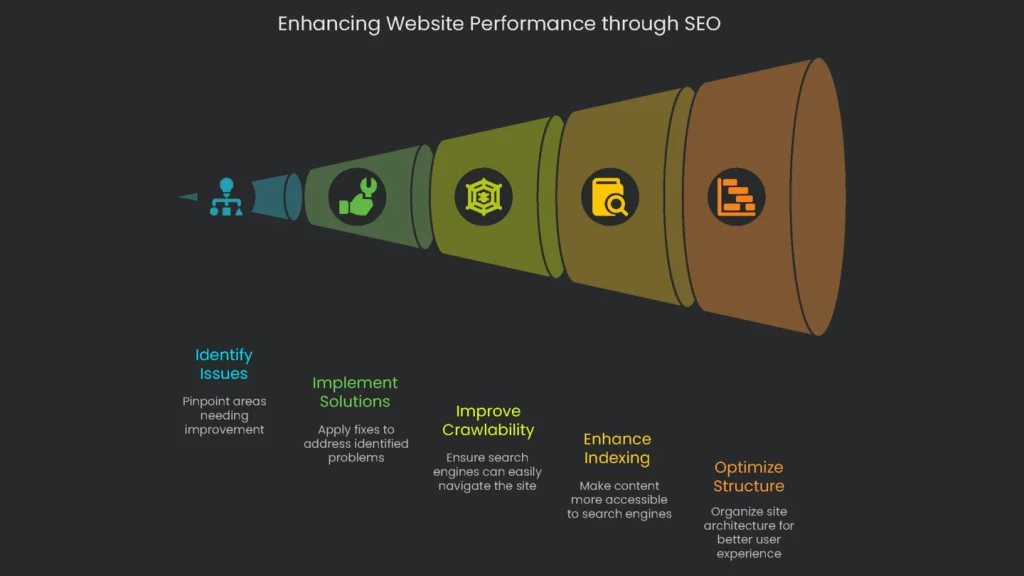
A thorough technical SEO audit may seem tricky, but it’s the bedrock of lasting organic growth. By examining crawlability, indexing, structure, speed, and related details, you can spot and clear persistent problems. Consequently, your great content becomes easier for bots and people to reach and enjoy. These checks are not just about patching cracks; they reinforce the core so your business outpaces rivals. For deeper tips, the SEO starter guide is a trustworthy next click. Finally, download our no-cost 50-Point Technical SEO Audit Checklist to stay on track. Feeling swamped? The data only matters if you act. Let the Technicalseoservice team handle the audit and deliver a clear, ranked plan for growth.
Implementation steps
- Define the audit’s aim, digital zones, and data taps.
- Execute site crawls, gather log data, and fetch from GSC and Analytics; summarize results.
- Rank obstacles by their impact, effort needed, and risk then lay out a clear work plan.
- Write precise work tickets naming owners, deadlines, and success checks.
- Confirm fixes, re-crawl as needed, and deliver the positive summary
Frequently Asked Questions
Where do I begin?
I start with a crawl and a complete list of URLs, templates, and states ready.
What do I look for?
I check for indexation, site architecture, loading speed, schema, links, and security.
How do I prioritize tasks?
I score each by potential impact, amount of effort, and level of risk, then build a practical roadmap.
What do I deliver?
An easy-to-follow report that names who does what, when, and what the expected results are.
Should I crawl again after fixes?
Absolutely; I need to verify the changes and see how Core Web Vitals and coverage scores have moved.