Audit transparency, enduring case studies, and migration wins all point towards the refined answer. We give guidance on the red flags to avoid, questions to ask, and how to unify on KPIs from the very first day.
Strengthening the Website That Drives Your Business
Think of your site as the crown jewel of your business. Yet a hidden leak can drain profits before you notice. When dusty wiring slows your site, leads leave and your marketing budget keeps burning. Therefore, finding the right technical SEO firm is an investment, not a side project. The right crew seals those leaks. However, the wrong crew might install the wrong pipe, leaving you with expense and damage.
In this post, we arm you with seven questions to test candidates. In short, these will shrink the sales show and reveal how they really operate.
Technical Audit Process
Why It Counts
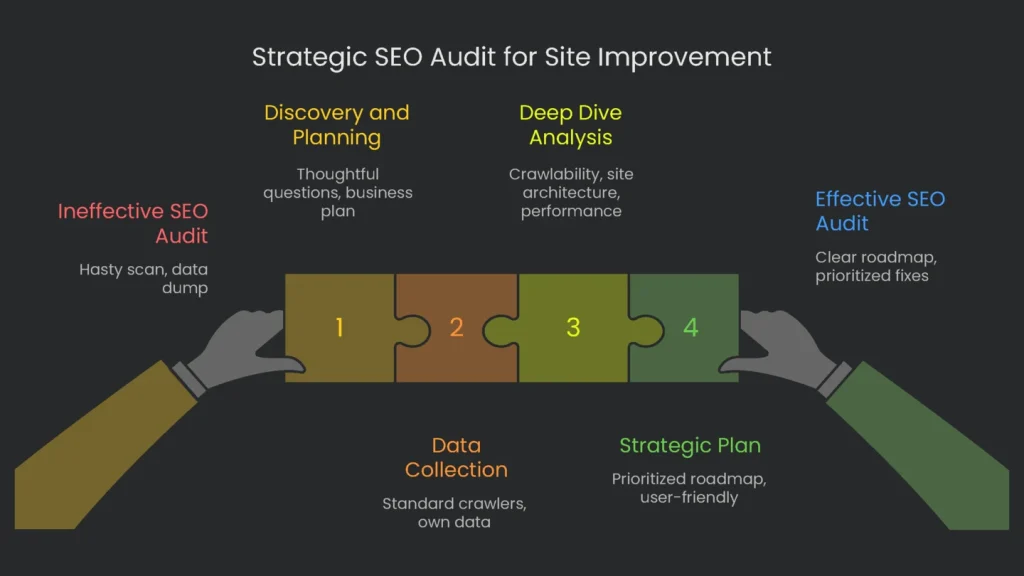
The answer shows whether a firm ships cookie-cutter reports or dives into your site’s skeleton. Look for a clear walkthrough: crawl analysis, server log checks, mobile responsiveness, index speed, and Core Web Vitals. When they reveal their process, they prove they can make your site faster and stronger. Speed reveals more than a stopwatch. As a result, it shows whether an agency pushes a software button or builds an action plan. A hasty scan fires back a data dump. A smart scan returns a sprint plan.
Agencies that barely skim the surface usually run their entire engine that way. Conversely, agencies that hunt root problems, revenue ties, and growth wind start with detailed audits. Therefore, their audit announcement becomes a billboard of values. Quick, checklist audits signal box-checking, not breakthrough results. In short, the pace, data, and intent show whether the audit is a pit stop or a blueprint for the course.
What a Good Answer Looks Like
The best answer arrives with a visible playbook, not an automated tool slip. Next, their answer maps the crawl before software footprints even enter the room.
Discovery and Planning
The best first replies start with thoughtful questions. For example: Tell me about your business plan. What are your top three revenue pages? What were your last five SEO plays? Who are your key market players? The goal comes before any software audit. Consequently, context lifts every tool. Starting specific ties the technical audit to bigger business goals. Therefore, section five zooming into that setting keeps the team out of the weeds.
Data Collection
After that, the team explains how they gather more info. They rely on a toolbox, not a lone gadget. That toolbox should include:
- Standard Crawlers: They explain why something like sitebulb.com lets the team pretend to be a search engine. Consequently, they can load many pages, grab status codes, and spot missing meta tags in one run. They also set the system to mimic Google’s mobile bot, since most indexing now starts from a smartphone view.
- Your Own Data: They call for a pull from Google Search Console and Google Analytics. Search Console shows how Google sees the site, including crawl hitches, indexing blocks, and Core Web Vitals. Analytics shows how visitors click, scroll, and convert, which provides the customer story.
Deep Dive into Key Areas
Next, the audit’s heart kicks in. The team digs into technical SEO’s most critical parts. An effective audit will survey several of these zones:
- Crawlability & Indexability: This is the foundation. They check the robots.txt file to avoid sneaky blocks. Then they review XML sitemap health. Next, they hunt wasted crawl budget. Finally, they fix indexing issues, like stray noindex tags or off-target canonical tags.
- Site Architecture: They examine URL structures, internal linking, and click depth. As a result, they find orphan pages and clean the path for users and search engines.
- On-Page Technicals: They review title tags, meta descriptions, H1/H2 hierarchy, and Schema markup. Consequently, they fix errors and target rich snippets.
- Site Performance: They zero in on speed and UX. They track LCP, INP, and CLS. Tools like PageSpeed Insights and Lighthouse support these checks.
- Log File Analysis: For large sites, pros mention log file analysis. They study how Googlebot crawls the site. As a result, they spot crawl budget waste and sneaky problems.
The Deliverable: A Strategic Plan
The report you get is as vital as the analysis. A top agency won’t drop a giant PDF of charts. Instead, they deliver a clear, prioritized roadmap you can follow. Here’s what that plan should do:
- Sort by severity: Group problems as Critical, Warning, or Notice so you can see what to fix first.
- Rank by impact and effort: Line up fixes by SEO lift, business value, and real workload.
- Explain both “why” and “how”: State the reason behind each move and the steps for developers.
- Be user-friendly: Provide a slide deck for the big picture, a tracking spreadsheet, and ticket samples ready for Jira.
Red Flags
- Vague Process: “We scan, then send a report.” This signals a tool resale, not problem-solving.
- No Context First: They skip goals and jump straight into a plan.
- Score-Score-Score: They wave a tidy “health score” without briefing your team on priorities.
- Quick Fix ➡️ Fast Fail: They chant “one-day audit” for a deep site. Consequently, promises outrun reality.
- Double-Dump Report: The “final report” is a tool export with no priorities. Teams see pages as numbers and tasks with no order. Suddenly, “it’s not broken” becomes the refrain. Trust drops, time slips, and work turns into a treadmill.
Real-World Case Studies
Why It Puts it All on the Table
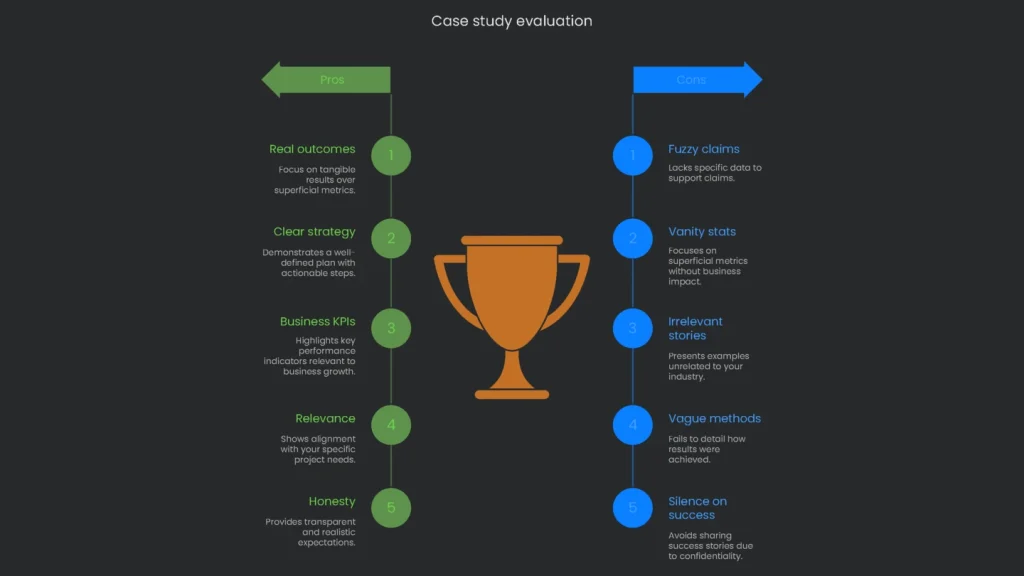
Swap brag stats for real outcomes. Consequently, the room learns lessons, not buzzwords. This question anchors pitches in the world your team lives in. Therefore, it reveals whether they can steer the ship, not just chart a perfect port.
When you read a case study, look for three clues. First, did the agency work on your kind of project, like a domain move or a JavaScript-heavy site? Second, do they track business numbers-new leads and sales-or vanity traffic? Third, can they sketch a clear plan and link steps to results? In short, a good case study is proof, not fluff.
An A+ case study is clean and logical. It reads like a short story: Problem > Solution > Results.
What You Want to See
- The Challenge: A no-nonsense summary of the issue. For example, “A B2B software company lost 40% of organic traffic after a domain change,” or “An e-commerce site had 8,000 thin pages clogging crawl budget.”
- The Strategy & Actions: They connect each step to the audit. Instead of “we fixed technical issues,” they say, “we removed 5,931 low-value pages and kept 2,535,” or “we tagged 10,000 product pages with Product and Review schema.”
- The Results: They end with specific, business-level facts. For example:
- “Desktop organic traffic grew 96% year over year.”
- “Top-3 keyword count rose 334%.”
- “The health score jumped from 8 to 76.”
- “More visitors converted, and the client hit the yearly sales goal four months early.”
Focus on Business KPIs
Great case studies use numbers a finance chief understands. Therefore, they show organic conversions, sales from organic search, and lead-to-sale rates. Traffic cost can appear as a benchmark to value the channel.
Relevance and Honesty
An agency shares work similar to your company, or they say, “we haven’t done that yet, but we can test with you.” They align lessons from other projects to your needs. Finally, they are upfront about timelines. SEO wins need patience and consistent effort.
Red Flags
- Fuzzy Claims: “We boosted their online presence,” with no numbers or timelines.
- Vanity Stats: Click impressions or Domain Authority without leads or sales.
- Irrelevant Stories: A local pizzeria case for a global SaaS.
- Vague “How”: Big wins with no methods.
- Silence on Success: “We can’t share anything.” Reputable firms usually have sanitized examples.
Team Collaboration
Why This Counts
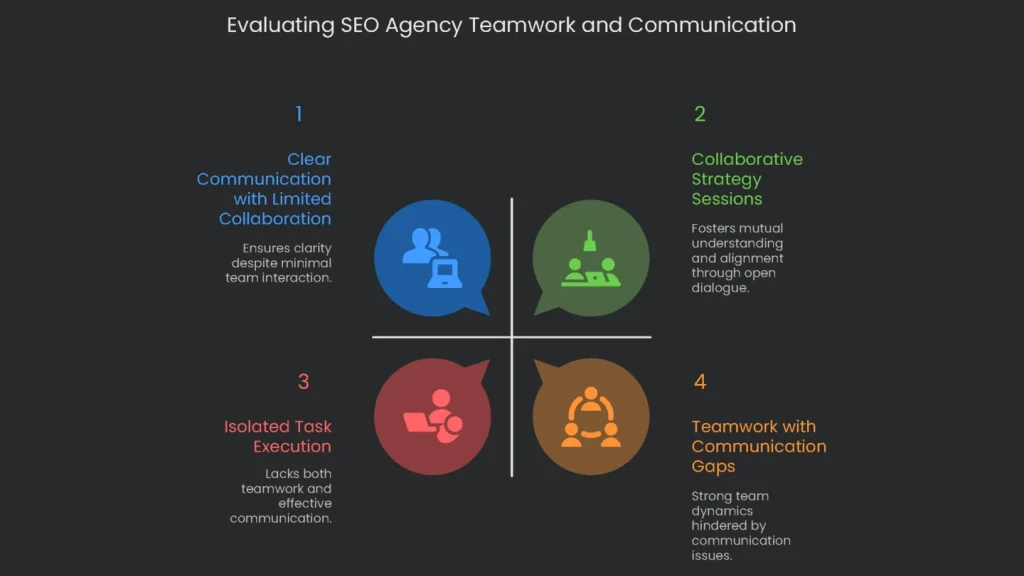
Technical SEO is a relay, not a solo run. A team can draft brilliant plans, but value fizzles without smooth testing and handoff. This question shows how an agency will work with your crew. A smart team acts like allies, not task-throwers. Therefore, their teamwork plan hints at how much of their clever thinking you’ll actually ship.
An Ideal Response Looks Like This
The best reply proves adaptability and organized steps. It also shows they understand the headaches your crew faces.
Team-First Attitude
They describe the relationship as a team-up. Look for phrases like “we slot into your marketing squad” or “we match your rhythm.” They admit your crew knows the brand best. Consequently, they plan to lean on that knowledge.
Solid Communication Plan
An on-the-ball agency offers a clear communication cadence. They recommend the right apps and huddle schedules. Typically, this looks like:
- Shared Slack or Teams channels for quick questions.
- Weekly or biweekly calls to track progress and blockers.
- Project tools like Jira, Asana, or Trello so tasks and timelines stay visible.
Collaborating with Developers
This part can make or break a project. Top agencies know developers are busy. Therefore, they translate tough SEO asks into clear, bite-sized tasks:
- A short title and quick summary of the issue.
- A brief note on business impact to drive priority.
- Step-by-step guidance with code snippets when needed.
- A testing checklist and instructions to confirm the fix.
With clear instructions, developers guess less and deliver faster. Consequently, issues get fixed correctly the first time.
Adaptability
The agency adapts to how your team works. Some clients need only a roadmap. Others need hands-on execution. A solid partner plays strategist, builder, or both-without fuss.
Red Flags
Read these signs before moving ahead.
- The Lexicon of Silence: “We email a slideshow. Implementation is on you.”
- The Ruler-Driven Alliance: “We only use Jira; accept or decline.”
- “Who’s Coding Anyway?”: Dismissive jokes about coders.
- The Fog of Updates: Vague promises to keep you “in the loop.”
- The Tower of Separate Towers: Tactics live in a “Digital” box with no alignment to Marketing or PR.
Measuring and Reporting Success
Why This Matters
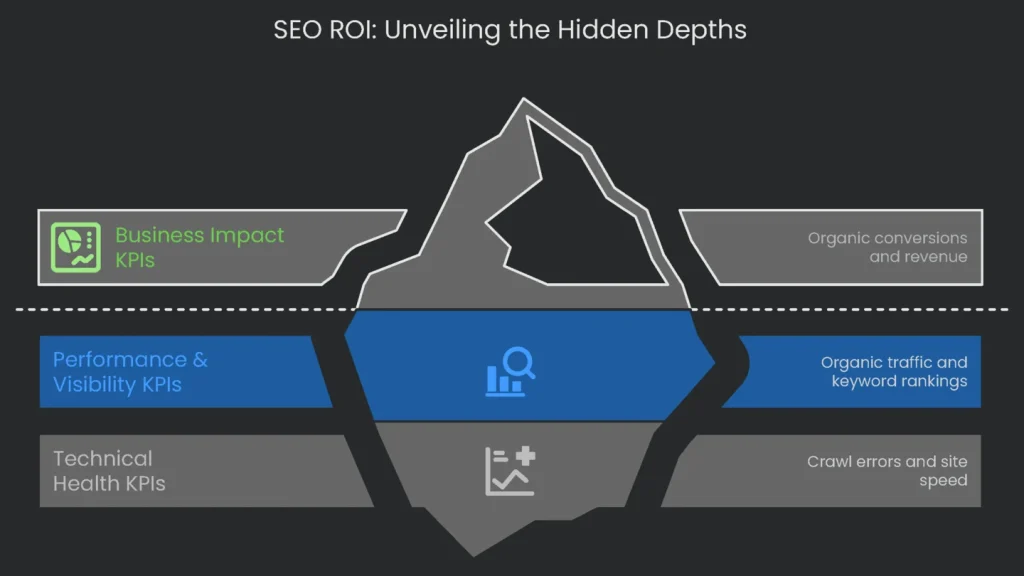
This question digs into value and ROI. It shows whether the agency knows the difference between doing more and driving growth. The right partner links activity to outcomes and shares the same numbers you care about. If they report on your business outcomes, it shows partnership. If they report on big but hollow numbers, they still see you as a customer, not a teammate.
What a Good Answer Looks Like
Strong answers mention a “hierarchy of metrics” or a “measurement framework” that maps tech readouts to cash-flow success.
| Tier Level | KPI Category | Example Metrics |
| Foundation | Technical Health KPIs | Crawl Errors, Indexation Status, Site Speed & Core Web Vitals, XML Sitemap Health |
| Middle Tier | Performance & Visibility KPIs | Organic Traffic, Keyword Rankings, Organic Click-Through Rate (CTR) |
| Top Tier | Business Impact KPIs | Organic Conversions, New Leads/Sales from Organic Search |
Solid Foundation: Technical Health KPIs
They first tune the engine so momentum builds. Early signals include:
- Crawl Errors: Search Console reveals whether bots hit problems finding content.
- Indexation Status: The count of indexed pages is tracked and corrected quickly.
- Site Speed & Core Web Vitals: LCP, INP, and CLS stay in view because users and rankings depend on them.
- XML Sitemap Health: Sitemaps remain tidy and refresh on time.
Middle Tier: Performance & Visibility KPIs
Next, they tie the solid foundation to visibility in search results.
- Organic Traffic: Non-branded traffic shows new audiences finding you.
- Keyword Rankings: Focus on valuable, likely-to-convert terms and SERP features like Featured Snippets.
- Organic CTR: Titles and meta descriptions that win the click.
Top Tier: Business Impact KPIs
Finally, they connect every step to revenue.
- Organic Conversions: Sales, trial sign-ups, or qualified leads from unpaid traffic.
- RIGHT MEASUREMENT: They lay out exactly how ROI is computed for your model. For e-commerce, map growth to revenue. For B2B, assign value to qualified leads.
- MEANINGFUL REPORTS: Insight beats raw numbers. Ask for personalized dashboards that explain results, reasons, and next steps.
- AVOID VANITY: Demand metrics tied to purchase intent, not just volume.
- USEFUL KPI: Track CTR for high-intent, non-branded terms.
- DATA WORTH REPORTING: Watch indexation rate and error rate to gauge overall health.
Is the money we spent on SEO paying off?
Warning Signs to Watch For
- Time-Wasting on Rankings: Nobody asks whether the keyword sells.
- Pretty Charts, No Revenue: Lots of “impressions” and Domain Authority, but no cash impact.
- Off-the-Shelf Reports: A canned dashboard with no custom insights for our team.
- Conversion Tracking Mystery: Goals don’t tie to tracking. Therefore, revenue never shows up.
Handling Google Algorithm Updates
Why This Matters
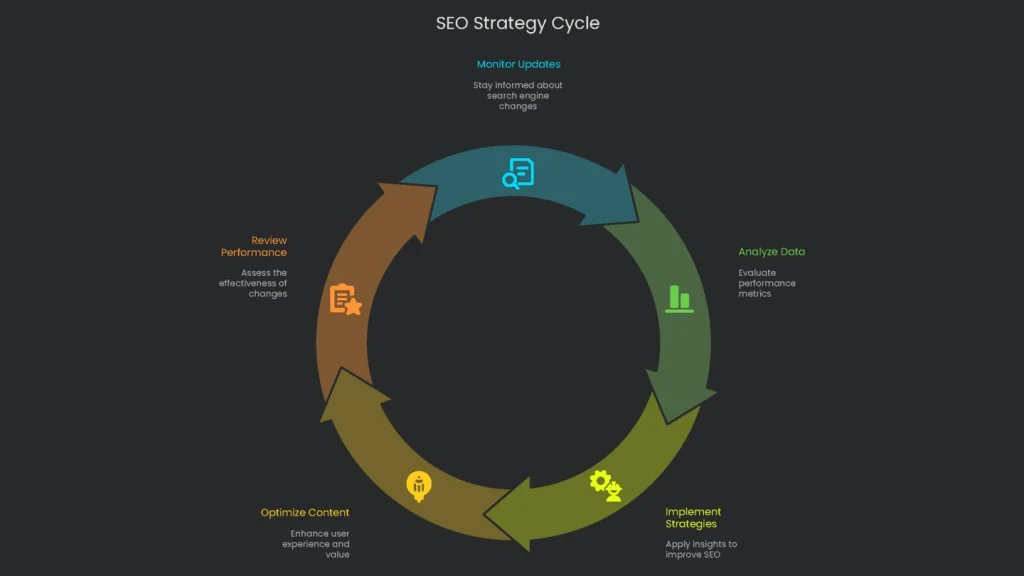
Search changes constantly. Google flips thousands of switches every year. Ask whether the agency keeps training or is stuck in the last “dance.” Do they panic at buzzwords, or build sites that stay steady? The reply reveals foresight. Chasing every rumor traps teams in quick fixes. Therefore, success favors serving users with valuable content and thoughtful design.
Here’s the Answer to Watch For
A seasoned agency speaks calmly and prizes stability over adrenaline. Consequently, they follow a measured playbook.
Where the Agency Watches
They monitor official sources daily: the Core Updates page and the Search Liaison feed. Then they review leading publishers like Search Engine Journal and tested practitioners who treat each update as a lab report.
No Theories, Just Numbers
When a Core Update lands, they don’t spasm. Instead, they:
- Let the rollout settle, often a week or more.
- Collect morning and afternoon data from Search Console and Analytics. They compare a week before and a week after.
- Filter out seasonal or holiday noise.
- Sketch the update’s focus and map opportunities for high-value visitors.
Back to the Core (Why Trust Lasts)
They favor durable strategy over scrambling. They keep the spotlight on ideas Google always backs:
- Helping People Comes First: They lean on E-E-A-T and build useful content.
- Delighting Users: They ship fast-loading, mobile-friendly pages with clear paths. What Google loves, customers love.
- Cleaning the Back Office: They keep code tidy, links healthy, and crawl budget in check. Consequently, resilient sites ride out updates.
Regular Check-Ups Prevent Breakdowns
The checklist is an insurance plan. Technical tune-ups and content reviews are ongoing, not one-off. Therefore, when updates drop, best practices are already live, and risk stays low.
Team Structure and Experience
What to Expect
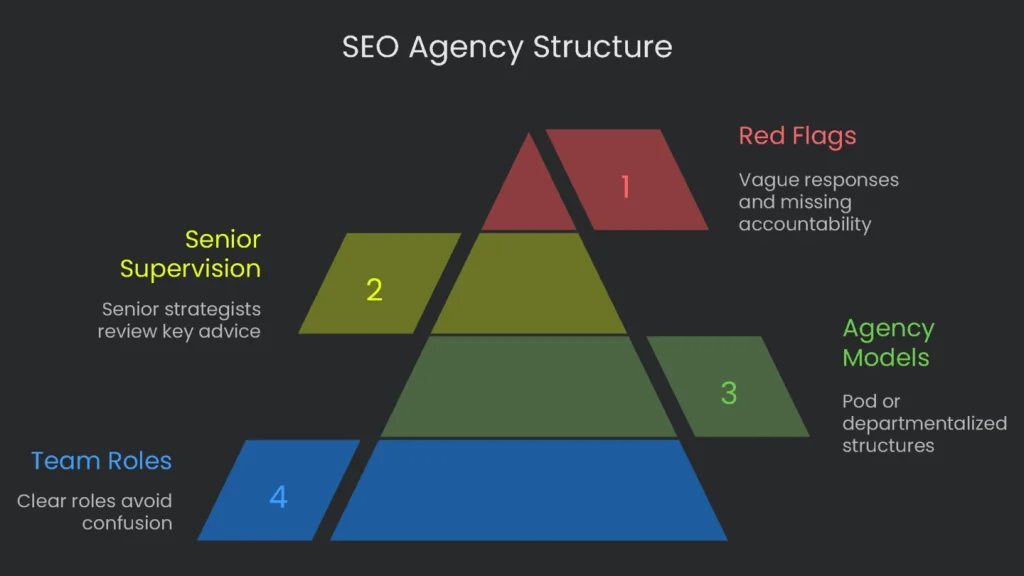
A good agency says, “Here’s the breakdown.” You get an account manager as your main point of contact, an analyst for data, a content strategist, and a tech specialist. Everyone has at least three years of experience, and bios sit on the site. Transparency lets you match fees to skill. If anyone dodges, that’s a red flag. Ask anything, and a client-first agency will answer.
Roles and Responsibilities
They break down roles to avoid confusion.
- The Go-To Person (Account Manager or Lead Strategist): Aligns goals, sets the plan, and keeps projects on track.
- The Team of Pros: You meet the doers-Tech SEO Analyst, Content Marketer, and others-with names and short bios.
A Peek Behind Their Scene
They share how work actually gets done. Most use one of two models:
- The Pod Structure: A small, cross-trained pod stays on your project for the entire engagement. Typically, it includes an account manager, an SEO expert, and a content creator.
- The Departmentalized Model: Specialists from technical SEO, content, and more team up under a Head of SEO.
Senior Supervision Guaranteed
Even if a newer member handles legwork, a senior strategist reviews and approves key advice and final reports. You also get access to seniors in key meetings. Top agencies bring them into late-stage sales calls to build trust early.
Red Flags
- Vague Responses: “Everyone will be involved,” with no names.
- Solo-Show Claims: One person promises to run everything on a sizable project.
- Missing Accountability: You can’t tell who strategizes versus who executes.
- No Meet-the-Team Offer: They block access to the people handling your account.
Handling JavaScript-Heavy Sites
Why It’s Critical
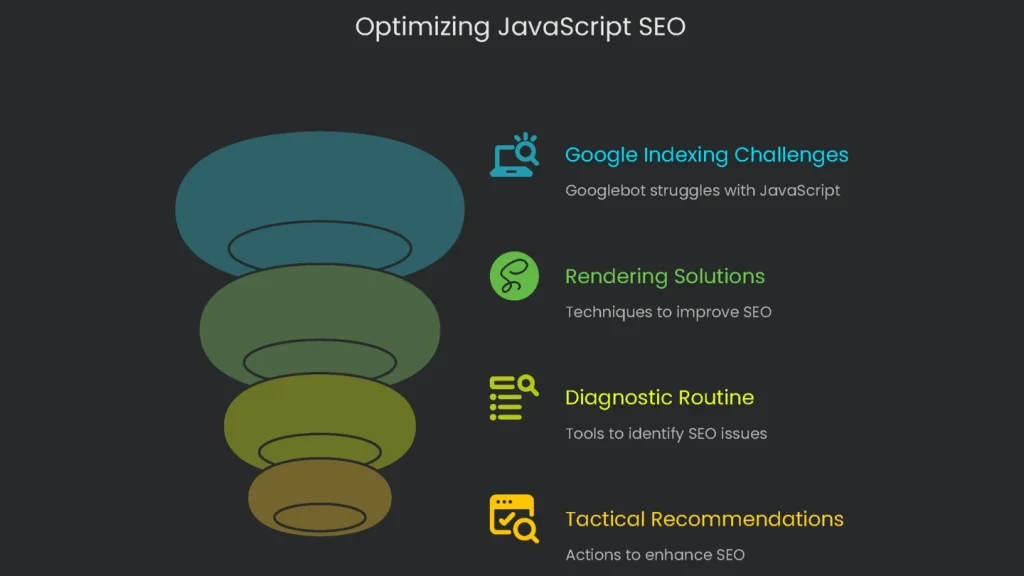
This question reveals true technical depth. Many sites run on JavaScript frameworks like React, Angular, and Vue. These build lively UX but can trip up search engines. Therefore, an in-depth answer signals skill. How they use Prerender also hints at broader know-how.
What the Strong Reply Looks Like
The best companies welcome this question. They treat it as a spotlight to show their thinking.
Outlining the Challenge
First, they explain why JavaScript is tricky for search:
- Google’s Two-Wave Indexing: Googlebot hits basic HTML first and renders JavaScript later. If rendering lags, pages may get misplaced.
- Google’s “Render Budget”: It’s finite. Large sites compete for attention. Therefore, some JavaScript stays unrendered and invisible for indexing.
Real-World Rendering Solutions
Experts don’t preach one quick fix. Instead, they outline rendering styles and advise the best fit:
- Client-Side Rendering (CSR): Common in JS frameworks. However, CSR turns the browser into the page builder. Errors or third-party blocks can break the crawl. See page load risks.
- Server-Side Rendering (SSR): Often the SEO-friendly option. The server sends full, crawl-ready HTML first. Robots see titles and links immediately.
- Dynamic Rendering: A pragmatic option for busy servers. Googlebot receives a static snapshot; users get the dynamic JS version. Keep metadata consistent in both.
- Static Site Generation (SSG): Pre-build pages as static HTML. The result is speed and search-friendly code.
A Step-by-Step Diagnostic Routine
They detail how they spot JavaScript SEO issues. The Inspection Tool in Search Console shows the exact HTML Googlebot gets, plus a rendered screenshot. Consequently, they can see missing content or links. They also run Screaming Frog in JavaScript mode for large-scale checks.
Tactical, Concrete Recommendations
Authorities list tactics that prove hands-on experience:
- Include key SEO signals in the first HTML. Do not inject canonicals or structured data later via JavaScript.
- Use standard
for internal links. Avoid JS-only events. - Ensure vital JS and CSS aren’t blocked in robots.txt, or rendering will break.
- Avoid
#fragments for navigation. Use the History API to create unique, crawlable URLs.
Warning Signs
- Blank Stare: “Google crawls JavaScript fine now,” with no proof.
- One-Size-Fits-All: “We always pre-render everything.”
- No “Why”: They drop terms like SSR but can’t explain trade-offs.
- No Testing Talk: They can’t show a single tool to confirm rendering and indexing.
Step up, and ask the right stuff.
Final Thoughts
Key Takeaway
Search Tip: Team Up, Don’t Just Hook Up
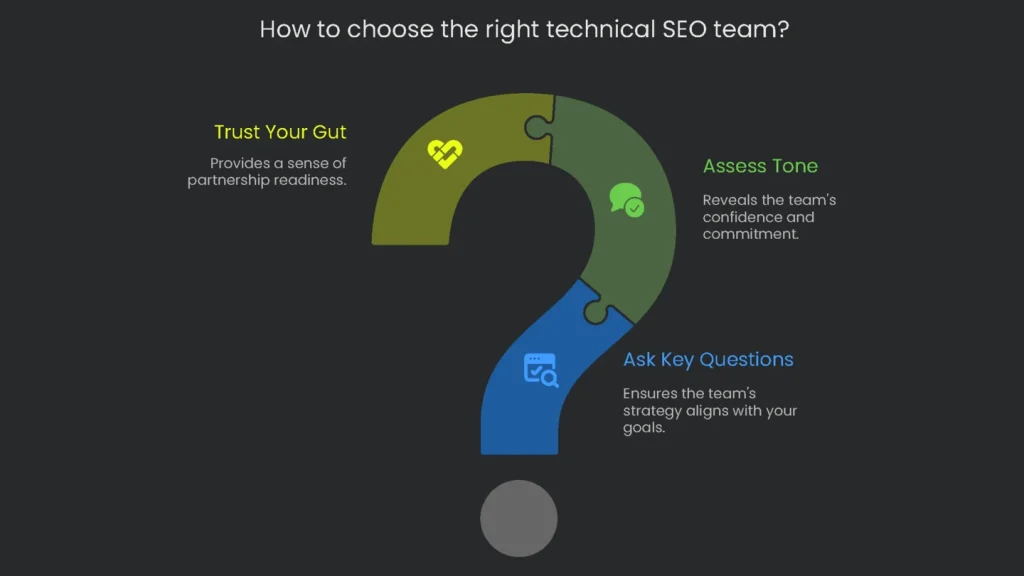
Searching for the right technical SEO crew can feel like a part-time job. However, finding the right match pays off like a long-term stock pick. The goal behind grilling agencies isn’t to be tough. It’s to cut through glossy slides and find a crew that acts like co-founders, not just consultants. You want a team that cares about your growth as much as you do.
Use our seven key questions while chatting and reviewing proposals. Pay attention to tone. A confident answer backed by strategy signals a strong match. The right team won’t flinch; they’ll show what they can do. Consequently, your gut will feel ready for partnership.
At TechnicalSEOService, we invite your seven, ten, or twenty questions. If you want a crew that treats you like a co-captain, not customer number seven, let’s fire up that coffee chat.
Implementation steps
- Restate goals, budget, timeline, and data access needs.
- List firms with similar project examples and proven tech stacks.
- Ask for targeted diagnostics, not one-size-fits-all sales pitches.
- Verify references and check alignment on reporting, service levels, and key metrics.
- Begin with a small pilot; scale up when the data proves success
Frequently Asked Questions
What do I look for first?
Launch stories, open-source dashboards, and proof that they’ve tackled workloads like mine.
Anything that should ring a bell?
Certainty with no proof, no log reviews, or a cloud of NDA-speak around everything.
What pricing options I’ll see in quotes?
Flat monthly fees, defined-scoped sprints, or punch-card hours for questions.
What do I hand them ahead of time?
Future targets, a countdown clock, permissions, and a shortlist of glitches we want to stress-test them on.
How should I line them up?
Draft identical specs and grade by potential value, grunt work needed, and budget.