
With GSC and PageSpeed to log analysis, you will discover safe methods to script audits, alerts, and recurring reports at scale, from easy routines you can automate to more complex processes that free up your time.
If you’re running a small site, doing SEO tasks yourself is totally doable. You can scan for broken links, tweak page titles, and watch how keywords perform in a few hours. However, once you reach the million-page realm of a corporate site, manual SEO is like trying to mop the ocean with a sponge. Therefore, keeping the technical bones healthy and spotting errors that can drag down sales needs speed and scale. At this level, human hands alone can’t keep up, so automation becomes the only sensible lane to drive in.
What is SEO Automation
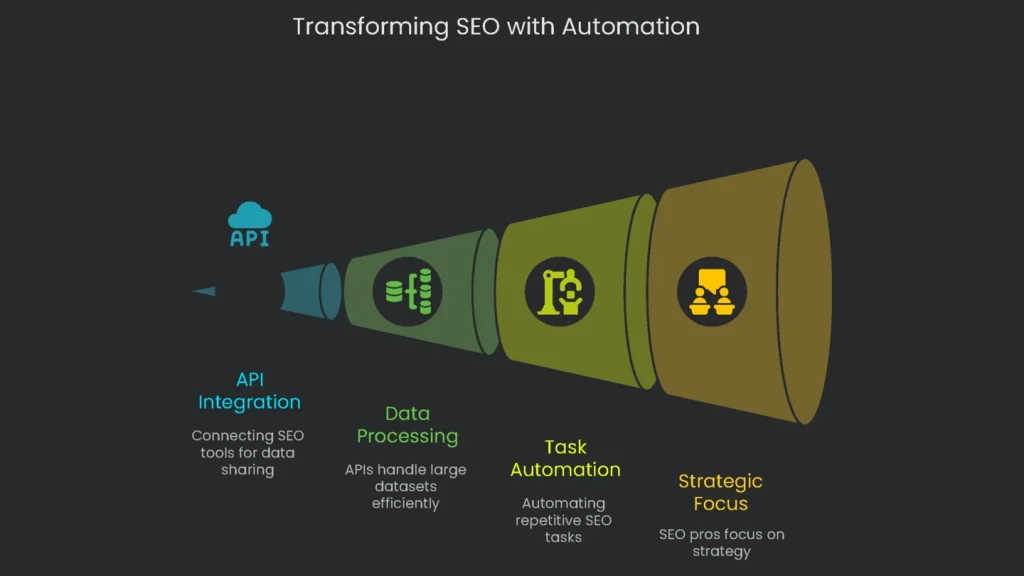
The magic ingredient here is the Application Programming Interface, or API for short. Think of APIs as switches that let SEO tools share information without waiting for a person to mash the keyboard. They pull in raw data, blend pieces from different programs, and smash through tasks that usually take vast armies of analysts. As a result, a million rows of inventory updates or a thousand meta tag rewrites run in the time it takes a database server to blink. Consequently, there is no waiting line for the next available SEO analyst. Instead, APIs keep the entire site in tip-top shape while you grab a coffee.
Switching from manual processes to automated systems marks an important win for SEO pros. When software workflows pull the same data again and again, the human eye and brain can drop busywork and move on to strategy. Therefore, you can forecast boosts and creatively out-maneuver problems. Automation also shifts the mindset from “How do we clean this mess later?” to “How do we keep this mess from forming at all?”. In short, this guide lights the path from inspiration to precise code, one detailed step at a time. Value an API for SEO and it becomes clear this is more than a tool—it’s a power-up. Sure, the top-line advantage is time saved; however, the deeper win is building aggressive, lean, and elastic SEO systems that teams can expand later.
Core Pillars of SEO Automation
Automate Repetitive Tasks
Pillar One focuses on turning minute-to-minute effort into “yeah, that’s covered.” Therefore, flipping tedious manual chores into automated mini-ecosystems pays off fast. For example, report summaries, daily keyword sweeps, and quick technical audits no longer demand a human. Consequently, the gifted human eye is budget-shifted toward high-impact tasks the algorithm can’t conquer: tracking rival gambits and sketching stories real humans want to share.
Scale Your Efforts
When your website has five million pages, doing technical SEO by hand is impossible. APIs are the secret weapon that helps you check every single page. With them, you can test for fast loading speed, scan server logs for errors, and confirm that new pages have been picked up by Google. Moreover, APIs work quietly in the background, letting you process and analyze millions of rows of data at the same time. As a result, even the largest sites get the same careful attention a smaller site could.
Combine Data for Better Insights
Thanks to APIs, you can tear down the walls between tools. Typically, SEO numbers live in separate homes: Google Search Console shows clicks, Google Analytics 4 explains user actions, Screaming Frog collects page details, and elsewhere you track backlinks with Ahrefs or Semrush. Therefore, APIs move all that data to one dashboard so patterns that used to hide jump out. For example, you might find that less crawling from Google means a smaller index and, in the end, a drop in sales. Consequently, the tools work together to tell a clearer story.
Proactive Site Monitoring
Old-school SEO waits until rankings tank. With API automation, the playbook flips. Imagine tiny programs checking your site every hour and flashing lights for any big glitch. For example, if pages vanish from Google’s radar or site speed tanks after a launch, a script catches it. Next, it sends a text or a Slack message to the crew. As a result, the issue gets fixed before it becomes a crisis. In short, you move quicker, smarter, and keep outpacing the competition.
Workflow: Automate Indexation Checks
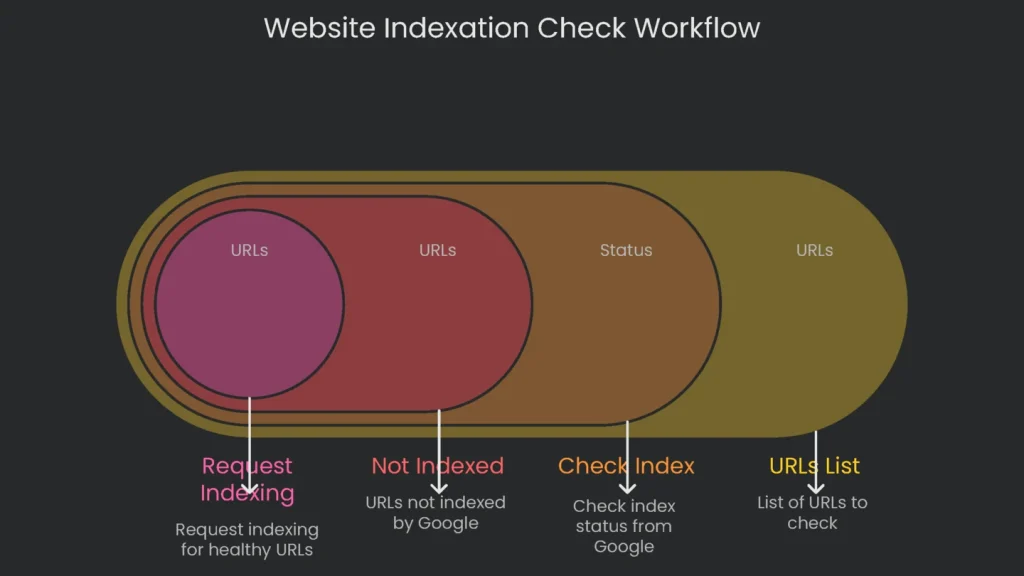
Concept: For a big site that changes a lot, getting fresh content indexed by Google fast is vital. This workflow automatically checks if main pages are indexed and sends the ones that aren’t straight to a priority crawl.
APIs Involved:
- Google Search Console API: Fetches a page’s current index status straight from Google.
- Google Indexing API: Tells Google and asks for a crawl of the specific page.
Process Overview:
- Getting Ready: Start by turning on the “Google Search Console API” and the “Indexing API” in your Google Cloud Platform project.
Next, create a service account and link it to your project. Then grant it “Owner” rights on your site in Search Console.
- Feeding the Script: The tool takes a list of URLs from a plain text file or a CSV. For example, you might include fresh articles, updated product pages, or URLs moved to a new site structure.
- Check Current Position: The script loops through the URLs and asks the GSC API whether each page is in Google’s index. It looks for a “PASS” result as the cue that the page is already covered.
- Logic Test: If a page isn’t indexed, the script checks why. It moves on only if the page shows a status like “Crawled – currently not indexed.” If it spots a critical block, such as a noindex directive, it marks that page for a human check rather than sending it forward.
- Request Indexing: For healthy URLs still waiting to be indexed, the script uses the Indexing API to ask for a crawl.
Heads-up: Google says the Indexing API is only meant for job ads and event pages. Still, many SEOs test it with regular pages and report solid wins. Therefore, keep it honest: only send pages you’d brag about, and avoid junk.
Python
import requests

import json

from google.oauth2 import service_account

from googleapiclient.discovery import build


# --- Configuration ---

GSC_SERVICE_ACCOUNT_FILE = 'path/to/your-gsc-service-account.json'

INDEXING_SERVICE_ACCOUNT_FILE = 'path/to/your-indexing-service-account.json'

PROPERTY_URI = 'https://www.yourdomain.com/'

URL_LIST_FILE = 'urls_to_check.txt'


# --- GSC API Authentication ---

gsc_credentials = service_account.Credentials.from_service_account_file(GSC_SERVICE_ACCOUNT_FILE)

gsc_service = build('searchconsole', 'v1', credentials=gsc_credentials)


# --- Indexing API Authentication ---

indexing_credentials = service_account.Credentials.from_service_account_file(

    INDEXING_SERVICE_ACCOUNT_FILE, scopes=['https://www.googleapis.com/auth/indexing']

)

session = requests.Session()

session.auth = google.auth.transport.requests.Request(session)

session.auth.refresh_token(google.auth.transport.requests.Request(), indexing_credentials)


# Function to check index status

def check_index_status(url):

    """"""Checks the index status of a URL using the GSC API.""""""

    request = gsc_service.urlInspection().index().inspect(

        body={'inspectionUrl': url, 'siteUrl': PROPERTY_URI}

    )

    response = request.execute()

    verdict = response.get('inspectionResult', {}).get('indexStatusResult', {}).get('verdict', 'VERDICT_UNSPECIFIED')

    print(f""URL: {url}, Verdict: {verdict}"")

    return verdict


# Function to request indexing

def request_indexing(url):

    """"""Submits a URL to the Google Indexing API.""""""

    endpoint = 'https://indexing.googleapis.com/v3/urlNotifications:publish'

    payload = {""url"": url, ""type"": ""URL_UPDATED""}

    response = session.post(endpoint, json=payload)

    if response.status_code == 200:

        print(f""Successfully submitted {url} to the Indexing API."")

    else:

        print(f""Error submitting {url}: {response.text}"")


# Main execution logic

def main():

    with open(URL_LIST_FILE, 'r') as f:

        urls = [line.strip() for line in f if line.strip()]


    for url in urls:

        status = check_index_status(url)

        if status != 'PASS':

            print(f""{url} is not indexed. Attempting to submit for indexing."")

            request_indexing(url)


# Start the script

if __name__ == '__main__':

    main()
Workflow: Build a Central SEO Data Hub
Concept: This workflow pools your SEO data into one spot, making analysis easier and keeping everything up to date with real-time feeds. It grabs key stats from Google Search Console, Google Analytics 4, and a tool like Ahrefs, merging them into a single spreadsheet. Consequently, this dataset is great for custom dashboards and deep dives.
APIs involved:
- Google Search Console API: Snags clicks, impressions, and avg. position for every page and search term.
- Google Analytics 4 Data API: Pulls user engagement and conversion info, like sessions and revenue, for every landing page.
- Ahrefs or Semrush API: Fetches competitive scores like Domain Rating, referring domains, and keyword tallies for specific URLs.
Process overview:
- Authentication: Google requires OAuth 2.0, while third-party tools use a simple API token.
OAuth 2.0 is the standard sign-in dance for Google APIs.
- Data extraction: The script calls each API for a specific date range. Data arrives neatly structured.
- Data consolidation: It uses the Pandas library to tidy incoming info and pack it into DataFrames.
- Data Merging: The code links DataFrames by page URL. First it connects GSC data to GA4 data; then it tacks on the Ahrefs data.
- Output: The finished DataFrame saves to a single CSV.
Looker Studio or Tableau can turn that CSV into dashboards that impress stakeholders.
With this merged file, the insights get sharper. By joining GA4 conversions with GSC queries, you find “Conversions per Query.” Therefore, you can show a manager the dollar value of SEO, neatly summed up.
Python
import pandas as pd

import requests


# Pre-set API clients. Keep those client secrets in your own safe vault.

# --- Configuration ---

AHREFS_TOKEN = 'your_ahrefs_api_token'

PROPERTY_URI = 'https://www.yourdomain.com/'

GA4_PROPERTY_ID = 'your_ga4_property_id'

START_DATE = '2023-10-01'

END_DATE = '2023-10-31'


# Grab Google Search Console data, empty data just “mock” in for planning.

def get_gsc_data():

    print("" ⛏️  Fetching GSC data..."")

    mock_data = [

        {'page': 'https://www.yourdomain.com/page-a', 'clicks': 1_000, 'impressions': 50_000},

        {'page': 'https://www.yourdomain.com/page-b', 'clicks': 800, 'impressions': 40_000},

    ]

    return pd.DataFrame(mock_data)


# Fetch your GA4 data, you know the flows and chalk cons.

def get_ga4_data():

    print("" ⛏️  Fetching GA4 data..."")

    mock_data = [

        {'landingPage':'https://www.yourdomain.com/page-a', 'sessions': 1_200, 'conversions': 50},

        {'landingPage':'https://www.yourdomain.com/page-b', 'sessions': 950, 'conversions': 30},

    ]

    df = pd.DataFrame(mock_data).rename(columns={""landingPage"": ""page""})

    return df


# Play pretend with the Ahrefs data fetch as well. This one 'fakes' values.

def get_ahrefs_data(urls):

    print("" ⛏️  Fetching Ahrefs data..."")

    mock_ahrefs_data = []

    for url in urls:

        if 'page-a' in url:

            mock_ahrefs_data.append({'page': url, 'url_rating': 75, 'refdomains': 200})

        elif 'page-b' in url:

            mock_ahrefs_data.append({'page': url, 'url_rating': 68, 'refdomains': 150})

    return pd.DataFrame(mock_ahrefs_data)


# The grand nature of gathering data!

def main():

    gsc_df = get_gsc_data()

    ga4_df = get_ga4_data()


    # Grab unique page links before we call Ahrefs

    unique_pages = gsc_df['page'].unique().tolist()

    ahrefs_df = get_ahrefs_data(unique_pages)


    # 2. Combine the data frames

    combined_df = pd.merge(gsc_df, ga4_df, on='page', how='left')

    complete_df = pd.merge(combined_df, ahrefs_df, on='page', how='left')


    # 3. Save as CSV

    complete_df.to_csv('seo_data_hub.csv', index=False)

    print(""seo_data_hub.csv created successfully"")

    print(complete_df)


if __name__ == '__main__':

    main()
Workflow: Track Core Web Vitals
Idea: Core Web Vitals (CWVs) matter for search ranking, and site speed can slip with new code or fresh content. Therefore, this workflow sets up an automated checker that regularly tests the CWVs of your most vital pages and alerts you if anything goes wrong.
API Used:
- PageSpeed Insights (PSI) API: Supplies lab data and field data collected via the Chrome User Experience Report (CrUX).
Process:
- Generate API Key: Get a free API key from the Google Cloud Console. It’s an easy step.
- Choose URLs: The script reads a list of your top pages: the homepage, key landing pages, and vital product pages.
- Set Auto-Run: Best practice is to run this script on a daily schedule. Consequently, you can compare how performance changes over time.
- Loop Through API Calls: The script makes two calls for each URL. First it checks the mobile version using the PSI endpoint. Next it checks the desktop version.
- Grab the Metrics: The script sorts out the vital stats from the API’s answer. It looks for the newest Core Web Vitals:
Largest Contentful Paint (LCP), Cumulative Layout Shift (CLS), and the newer Interaction to Next Paint (INP). Since INP replaced First Input Delay (FID) in March 2024, using it keeps your report current.
- Save and Notify: Scores get stashed in a master CSV with a timestamp. Immediately after, the script checks whether each score is below the “Good” level Google sets. If a threshold trips, the script fires an alert by email or Slack.
Python
import requests

import pandas as pd

from datetime import datetime


# --- Configuration ---

PSI_API_KEY = 'your_psi_api_key'

URL_LIST_FILE = 'critical_urls.txt'

RESULTS_CSV_FILE = 'cwv_monitoring_log.csv'


# Core Web Vitals thresholds for ""Good""

THRESHOLDS = {

    'LCP': 2500,  # milliseconds

    'CLS': 0.1,   # score

    'INP': 200    # milliseconds

}


def run_psi_check(url, strategy):

    """"""Gets PageSpeed score for a URL using given strategy.""""""

    api_url = (f""https://www.googleapis.com/pagespeedonline/v5/runPagespeed""

               f""?url={url}&strategy={strategy}&key={PSI_API_KEY}"")

    response = requests.get(api_url)

    if response.status_code == 200:

        return response.json()

    else:

        print(f""Error for {url} ({strategy}): {response.status_code}"")

        return None


def extract_cwv_metrics(psi_data):

    """"""Pulls specific Core Web Vitals data from PSI response.""""""

    metrics = {'LCP': None, 'CLS': None, 'INP': None}

    # The keys for the metrics might change. Check the official docs each time.

    lh_metrics = psi_data.get(""lighthouseResult"", {}).get(""audits"", {})

    metrics[""LCP""] = lh_metrics.get(""largest-contentful-paint"", {}).get(""numericValue"")

    metrics[""CLS""] = lh_metrics.get(""cumulative-layout-shift"", {}).get(""numericValue"")

    metrics[""INP""] = lh_metrics.get(""interaction-to-next-paint"", {}).get(""numericValue"")

    return metrics


def main():

    with open(URL_LIST_FILE, ""r"") as f:

        urls = [line.strip() for line in f if line.strip()]


    results = []

    timestamp = datetime.now().isoformat()


    for url in urls:

        for strategy in [""mobile"", ""desktop""]:

            print(f""Checking {url} on {strategy}..."")

            psi_data = run_psi_check(url, strategy)

            if psi_data:

                cwv = extract_cwv_metrics(psi_data)


                # Check against thresholds for alerting

                if cwv.get(""LCP"") and cwv[""LCP""] > THRESHOLDS[""LCP""]:

                    print(f""ALERT: LCP for {url} ({strategy}) is {cwv['LCP']}ms (threshold: {THRESHOLDS['LCP']}ms)"")

                if cwv.get(""CLS"") and cwv[""CLS""] > THRESHOLDS[""CLS""]:

                    print(f""ALERT: CLS for {url} ({strategy}) is {cwv['CLS']} (threshold: {THRESHOLDS['CLS']})"")

                if cwv.get(""INP"") and cwv[""INP""] > THRESHOLDS[""INP""]:

                    print(f""ALERT: INP for {url} ({strategy}) is {cwv['INP']}ms (threshold: {THRESHOLDS['INP']})"")


                results.append({

                    ""timestamp"": timestamp,

                    ""url"": url,

                    ""strategy"": strategy,

                    ""lcp_ms"": cwv[""LCP""],

                    ""cls_score"": cwv[""CLS""],

                    ""inp_ms"": cwv[""INP""]

                })


    # Append results to the log file

    new_results_df = pd.DataFrame(results)

    try:

        existing_df = pd.read_csv(RESULTS_CSV_FILE)

        combined_df = pd.concat([existing_df, new_results_df], ignore_index=True)

    except FileNotFoundError:

        combined_df = new_results_df


    combined_df.to_csv(RESULTS_CSV_FILE, index=False)

    print(f""Results saved to {RESULTS_CSV_FILE}"")


if __name__ == ""__main__"":

    main()
Workflow: Find Internal Link Opportunities
Concept: On a large site, finding good places to add internal links is slow but surprisingly important. Therefore, this workflow automates the process. It hunts for pages that mention your phrase and suggests spots to add a link.
Key Tools and Setup:
- Running the crawler in headless mode to export the data you need.
Screaming Frog SEO Spider in CLI mode gets the site crawl on autopilot and dumps the info you need.
- A quick configuration to capture inlinks and page text.
Python script smoothes the crawl output and highlights promising spots.
How it Works:
- First, headless Screaming Frog goes to work.
With –headless, it crawls the entire site in the background. It spits out two files: one logging every crawl link and one pulling out the plain text from each URL.
- Next, give the Python file two inputs: the target URL you want to boost and the target keyword that anchors the link.
- Finally, the script loads those crawl files into pandas to sift visible text and link targets in seconds.
Python
# Please download ‘all_inlinks.csv’ and also save a customized version that has just the page text we want.

command = {

    print(""Starting Screaming Frog crawl… this may take a while.""),

    subprocess.run(command),

    print(""Crawl complete."")

}


def find_linking_opportunities():

    """"""Parses SF exports to find internal linking opportunities.""""""

    try:

        internal_all_df = pd.read_csv(f'{OUTPUT_FOLDER}/internal_all.csv')

        inlinks_df = pd.read_csv(f'{OUTPUT_FOLDER}/all_inlinks.csv')

    except FileNotFoundError:

        print(""Error: Crawl export files not found. Please run the crawl first."")

        return


    opportunities = []

    pages_already_linking = inlinks_df[inlinks_df['From URL'] == TARGET_URL]['From'].unique().tolist()


    for index, row in internal_all_df.iterrows():

        source_url = row['Address']

        page_text = str(row)

        if TARGET_KEYWORD.lower() in page_text.lower() and source_url != TARGET_URL:

            if source_url not in pages_already_linking:

                opportunities.append({

                    'Source URL': source_url,

                    'Target URL': TARGET_URL,

                    'Keyword Found': TARGET_KEYWORD

                })


    if opportunities:

        opps_df = pd.DataFrame(opportunities)

        opps_df.to_csv('internal_linking_opportunities.csv', index=False)

        print(f""Found {len(opportunities)} opportunities. Saved to internal_linking_opportunities.csv."")

    else:

        print(""No new internal linking opportunities found."")


if __name__ == '__main__':

    find_linking_opportunities()
How to Get Started
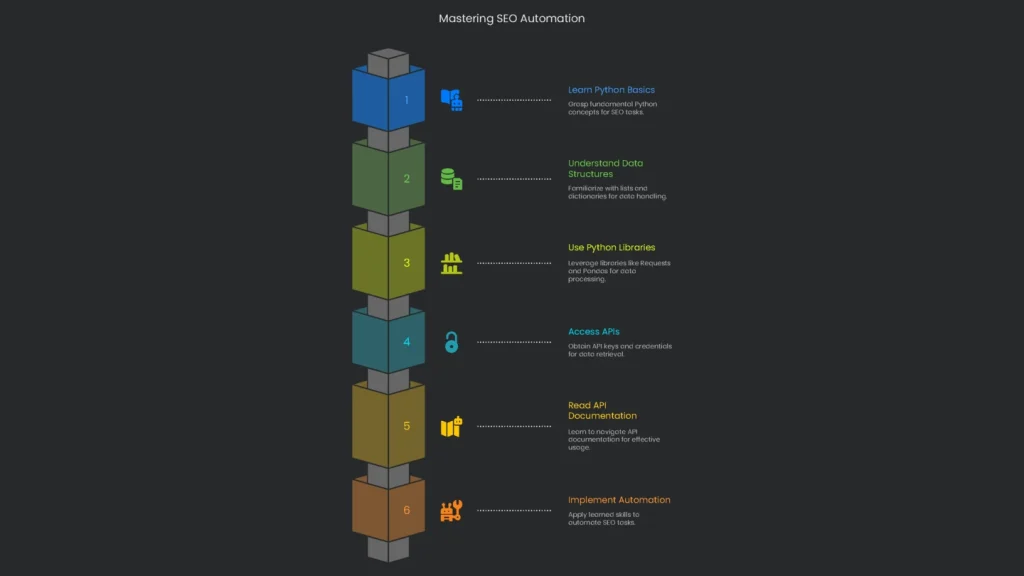
Kicking off automation might feel a bit overwhelming at first. However, the first steps are totally doable. Next, check out this mini checklist to guide your moves.
Getting the Hang of Python for SEOs
No, you don’t have to be a coding wizard to automate SEO tasks. Just grab a light dusting of Python—enough to join a few pieces—and you can build practical scripts that free up your time.
- What You Need to Know: Nail these building blocks:
- Variables, Loops, and Functions: Variables hold info like a list of URLs. Loops recheck each URL. Functions are reusable code containers.
- Lists and Dictionaries: Lists stack data in order, while dictionaries store key-value pairs. Therefore, you’ll use them often because they mirror common API data formats.
JSON is the simple format that APIs churn out.
- Grab the Right Tools: Python gets stronger with libraries.
- Requests: Your friendly messenger. Hand it an API link and it fetches data as JSON.
- Pandas: A mansion for messy data. Open CSVs, tidy rows and columns, and export polished tables.
Getting API Access
To start pulling in data, you first need access. Most services use API keys, which you grab from the developer console.
- For Google services, head to the Google Cloud Platform.
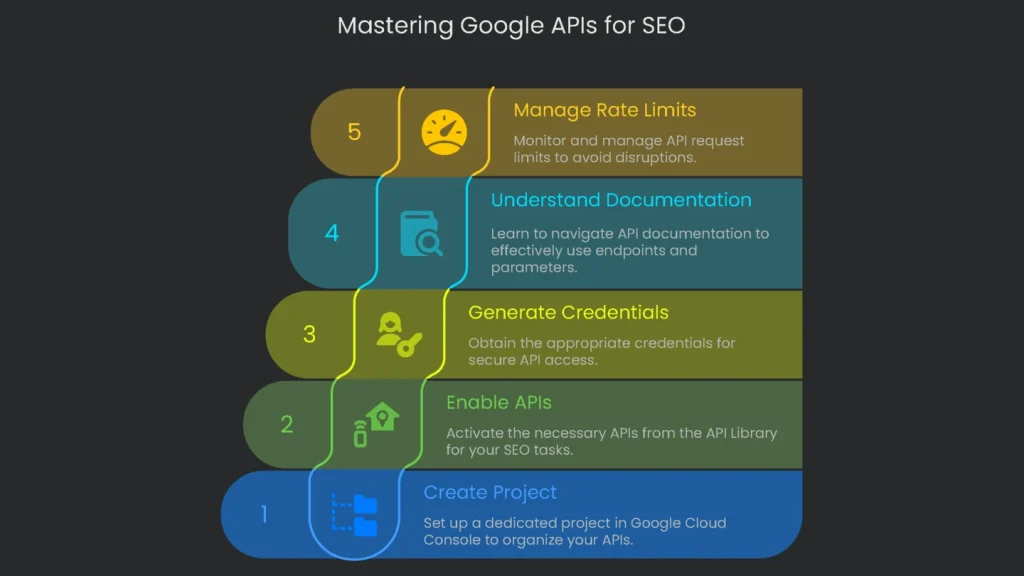
- Create a Project: Each API belongs to a project in the Google Cloud Console. Think of it as a folder for your data.
- Enable APIs: In the API Library, activate what you need, such as the Google Search Console API or the PageSpeed Insights API.
- Create a Project: Each API belongs to a project in the Google Cloud Console. Think of it as a folder for your data.
- Enable APIs: In the API Library, activate what you need, such as the Google Search Console API or the PageSpeed Insights API.
- API Key: A simple code for public APIs like PageSpeed Insights.
- Target the frequent grind (audits, alerts, reports) to ship to automation first.
- Link securities to Search Console, Performance scripts, analytics pipes, and crawl robots sourced with vault keys.
- Script and style lean code to grab, tidy, and beam warnings via lightweight notebooks.
- Set up automated jobs with cron or CI so they funnel results straight to dashboards, Slack, or Email.
- Audit the output each month, then lock down and scale up the automations that shine
For Google services, head to the Google Cloud Platform.
Generate Credentials: Pick the right type:
OAuth 2.0 Client ID or Service Account: Necessary for APIs that access private data, like Google Search Console or Google Analytics 4. As a result, your data stays secure.
Endpoints: The URLs you’ll send requests to.
Parameters: The “extras” you send with the request to get the exact data you need.
Authentication Method: The way the API checks your identity. Some want an API key; others need a token.
Rate Limits: Every API sets how many requests you can send in a time frame. Exceeding limits leads to temporary blocks or delays.
Conclusion: From SEO Tactics to SEO Systems

APIs have become the dividing line between good and excellent SEOs, especially at enterprise scale. The work shifts from repetitive, manual jobs to networks of automated, proactive tasks that scale. Consequently, the SEO role evolves from fixing single-page crises to designing a self-repairing machine that spots outliers, calms spikes, and pre-loads fixe. This is not a vague idea; it is a yes-required reality for the quarters ahead. As Google, Bing, and others lean harder into machine intelligence, serving clean, well-structured data matters more each day. Therefore, the automated pathways in this guide are starter blocks you can build on. The chapters move stage-by-stage; they do not replace sharp, data-rich people who operate the levers. The Technicalseoservice crew builds durable, custom systems that live in the cloud with top-tier data. Finally, if you want to evolve from monthly rituals into a laser-fast, omnipresent data core that delivers tomorrow’s decisions today, send us a note
Implementation steps
Frequently Asked Questions
What can APIs automate?
Regular audits, report generation, alerts, link checks, and Core Web Vital monitoring.
Which APIs are common?
Search Console, Analytics, PageSpeed Insights, and other SEO platform APIs.
What should I automate first?
Routine reports and quality alerts that would otherwise take a lot of manual time.
Any risks?
Be aware of rate limits, keep authentication secure, and monitor for data sampling issues.
Do I need to code?
A little basic scripting is useful, but you can also find no-code tools that link most other systems.