
Simplicity in SEO is control of JS. Learn rendering, hydration, routing, and CWV to improve performance on discoverability and speed.
Today’s web is all about JavaScript. It powers flashy animations, cool dropdown menus, and instant page transitions. Developer forums proclaim it the world’s top programming language, while frameworks like React and Vue take center stage on countless sites. Businesses bet big on these tools, convinced better code means happier visitors.
Yet, behind the curtain, trouble brews. The same code that dazzles users can leave search engines in the dark. When a browser loads a site, JavaScript springs to life and populates text and links. However, to Googlebot and its friends, the site can look blank unless the setup is right. Skip key steps and bots miss whole sections of content, cutting search traffic and stalling your climb in Google’s results. That wastes both eyeballs and the money spent on those fancy frameworks. Therefore, this guide jumps straight to the solution you need now: tackling the problems that pop up when Google sees your website.
The hiccup lies in how Google renders pages, which works in two steps. First, Google quickly crawls the basic HTML your server spits out. Next, the bot waits, runs the JavaScript, and then loads the final layout. Those extra seconds often cause frustration. As a result, most JavaScript rendering issues appear here. In the world of web pages, knowing this two-step dance is as key as having a storefront sign. Businesses that once got by without heavy JavaScript now can’t. Consequently, the risk is too real to wing it without a guide that speaks to both developers and marketers.
Breaking Down the Challenge: Google vs. JavaScript
Why the Mismatch Happens
Before you can fix what’s broken between your website and Google, you need a front-row view of the whole playback. JavaScript adds an extra layer after the server sends the first ticket-stub HTML. However, what Google sees from that basic stub can be a world apart from what visitors finally load in their browsers. Therefore, the mismatch is where trouble takes root.
Two Versions of Your Page: The DOM
This topic centers on the Document Object Model, or DOM, a behind-the-scenes blueprint of a webpage that programs use to tweak structure, design, or info. When improving search ranking, realize there are two DOMs on every site:
- The Initial HTML DOM: This DOM pops into life from the plain HTML sent by the server. To check it, right-click a site and pick “View Page Source.” Googlebot catches this snapshot on its first visit, so it forms the robot’s first impression of the site.
- The Rendered DOM: This DOM appears after all JavaScript finishes running. It may gather extra content, change colors, add buttons, and drop in links. Open the “Elements” pane in Chrome DevTools to see it in action. It’s the most up-to-date version, but only after every script finishes.
Modern web applications often drop a nearly blank HTML DOM on the user. The real meat—text, links, and images—arrives only after the browser springs into action. Consequently, the two DOMs have become the single biggest obstacle SEO pros face today.
How Google Makes Full Sense of a Page
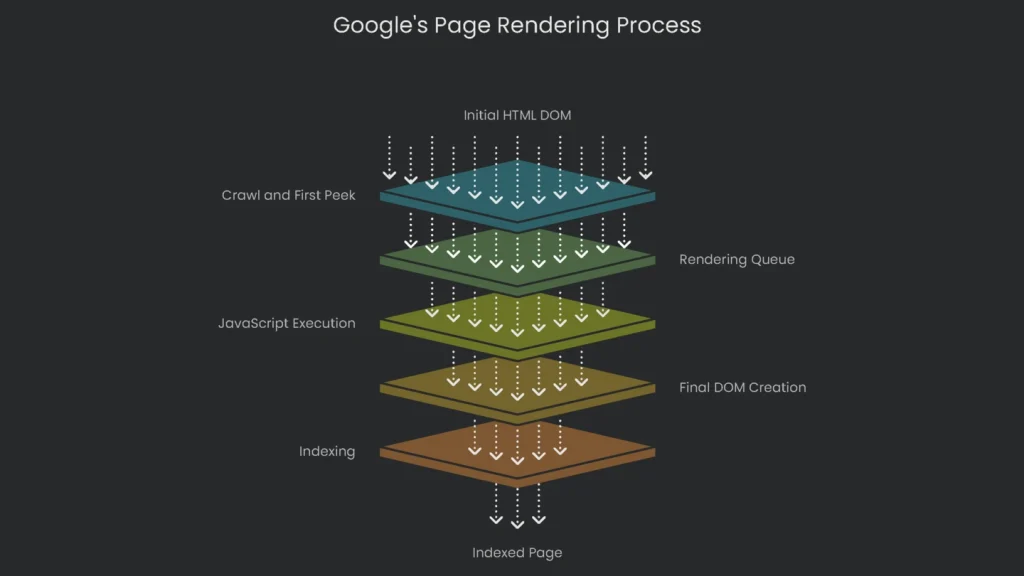
Crawl and First Peek
Right off, Googlebot gets the URL and checks the robots.txt file to see if it can come in. It reads the plain HTML, grabbing the visible text and traditional links. These links get tacked on to a “check later” list. If a link, image, or text needs JavaScript to appear, Google can’t see it yet.
The Rendering Waiting Room: Where It Gets Sticky
After that first peek, the page goes into Google’s rendering queue. That queue is where waiting often feels endless. Rendering is a power-sucking task, and Google can’t snap its fingers to render every page. Each page in line gets served by the Web Rendering Service (WRS), which runs a Chrome-like browser to execute JavaScript and transform the page. The time from crawling to rendering isn’t steady. Google suggests the average wait is around five seconds. However, in testing, it looked different. One report noted Google took nearly nine times longer to deal with JavaScript links than to visit regular HTML links. Other tests found that 5 to 50 percent of fresh, JavaScript-dependent pages were still missing from the index even two weeks after submission. Google Search Console shows a rendering timeout of about five to seven seconds. As a result, the service may quit if it runs that long. In short, a busy rendering queue eats time and the wait is unpredictable.
Final JavaScript Run and Indexing
After the rendering service reaches a page, it runs the JavaScript, builds the final DOM, and serves that to Googlebot. Googlebot then crawls the rendered page like a regular HTML document. It checks the page for new content, including links that JavaScript inserted, and adds those URLs to its crawl list. For today’s SEO, the rendered HTML is the real page that search engines index—not the original JavaScript code.
Wasting Crawl Budget
Crawl budget is how many pages Google will try to read from a website within a single visit. That number isn’t huge. Site size, speed, and popularity squeeze it tighter. Using JavaScript to render content eats a big chunk of that budget. Instead of reading simple HTML, Googlebot must work longer. Consequently, each extra JavaScript, CSS, or API request burns budget fast. One Google engineer said some sites see crawl numbers jump almost twenty times wider if rendering is used. On huge sites, that’s a nightmare. Googlebot can zap most of its budget on a small corner of the site and still leave key pages locked and forgotten. Worse, Googlebot has a hard limit: it will only read the first 15MB of any external JavaScript or linked CSS. If the key code sits beyond that line, a crucial feature can disappear from Google’s view. That makes the page appear broken—and that’s a gamble no site wants.
The Four Main Rendering Solutions
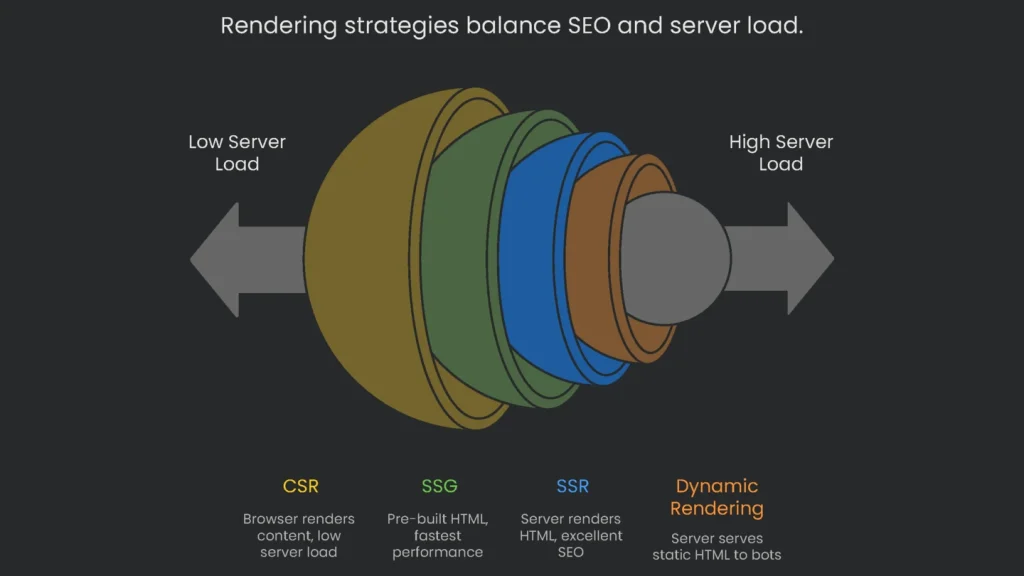
Client-Side Rendering (CSR)
- What It Is: Most apps using frameworks like React rely on this. The server ships a skeleton HTML document, then the browser grabs a giant JavaScript bundle. That bundle builds the page in the browser window.
- SEO Pros:
- Lower Server Load: The browser does the heavy lifting. That keeps server costs in check because you serve a lighter package.
- SEO Cons:
- Poor Initial Visibility: The first thing the bot sees is mostly empty. Real content sits inside JavaScript and appears only after execution.
- Indexing Delays: Only the rendering queue sees the JavaScript. The wait can stretch, and if scripts break, the page can vanish from the index.
- Poor Performance Scores: CSR pages load slowly because nothing lights up until JS downloads and executes. This drags
Core Web Vitals scores down and can hurt ranking.
Server-Side Rendering (SSR)
- What It Is: When a computer or search engine asks for a page, the server runs the app’s JavaScript. It gathers needed data, builds full HTML on the server, and sends that to the browser. The browser shows the page immediately and then finishes loading interactive features.
- SEO Pros:
- Great for Search: Search engines receive a complete page on the first try. Therefore, content is indexed right away.
- Fast Start: The browser loads full HTML immediately, which boosts perceived speed and helps Core Web Vitals.
- More Secure: The server controls what shows up, so sensitive data isn’t exposed to the user’s device.
- SEO Cons:
- Extra Server Work: The server must install and run the JavaScript framework, which is trickier and often costs more to host.
- Increased Server Traffic: Every request forces the server to generate fresh HTML, which can overload busy sites.
- Slower Interactivity: A page may look ready, but it waits for browser JS to hydrate before full interaction.
Static Site Generation (SSG)
- What It Is: Static Site Generation goes beyond SSR. It builds every page into ready-to-go HTML, CSS, and JavaScript before anyone sees it. When done, the flat files are dropped onto a simple web server or a
CDN.
- SEO Pros:
- Fastest Performance: SSG is hard to beat for speed. The server sends a finished, ready-to-use page, so Core Web Vitals look great.
- Perfect SEO: Crawlers find a complete HTML file waiting, which makes indexing smooth.
- High Security & Low Cost: No server logic means fewer security holes. Static files are cheap and scale easily.
- SEO Cons:
- Not for Dynamic Content: SSG struggles when content changes often or needs personalization. Altering one item can require rebuilding the site.
- Build Times: On super-sized sites, generating all pages can drag on.
Dynamic Rendering: A Sneaky Fix
- What It Is: Check out the full scoop. In short, the server looks at who knocked. Real people get the full JavaScript app. Search engines get a pre-built, fast, static HTML page.
- SEO Pros:
- Quick Win for Crawlers: It solves the visibility problem. Google and friends get straight, crawlable HTML. No rendering fuss for them.
- Perfect for Old Apps: If you can’t move to SSR or SSG, this bandage buys time.
- SEO Cons:
- Still a Workaround, Not a Badge: Google calls this a hack. They prefer SSR or SSG.
- Parity Headaches: Keeping one version for people and one for bots splits your site. The crawler page must match the user page to avoid being slapped for “cloaking.”
- Server Power Drain: Launching headless browsers on the server eats resources. On big sites with high bot traffic, costs pile up.
Rendering Strategies at a Glance
This snapshot explains the major facts about each rendering type so you can pick the one that fits your project best.
| Rendering Method | Initial Load (LCP) | SEO Friendliness | Server Load | Build+Maintain Difficulty | Best Fit |
| Client-Side Rendering (CSR) | Poor | Poor (needs hacks) | Very Low | Low | Apps and dashboards that don’t care about SEO. |
| Server-Side Rendering (SSR) | Excellent | Excellent | High | High | Busy sites like e-commerce or news that need SEO and interactivity. |
| Static Site Generation (SSG) | Best | Excellent | None (works off a CDN) | Medium (building time) | Static content like blogs and docs that don’t change often. |
| Dynamic Rendering | Poor (for users) | Excellent | Medium-High | Very High | Quick fix for complex CSR sites that can’t be moved to SSR or SSG. |
Spotting JavaScript SEO Problems
Overview and Mindset
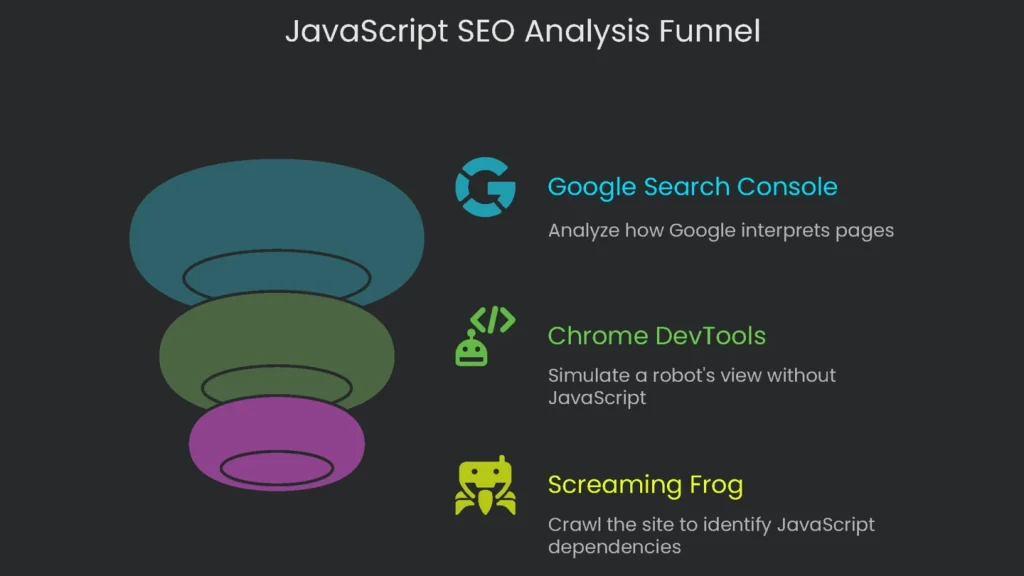
You can’t fix JavaScript SEO issues by glancing at the raw source. A technical SEO must observe pages at each rendering stage—from single pages to the whole site. Therefore, use three key tools.
Tool 1: Google Search Console
Google Search Console is the top tool because it shows how Google interprets your pages. The
Inspection tool section is the must-read.
Peek at the Crawled Page (Wave 1)
Type the URL into the box and run the check. When the report opens, click “View Crawled Page.” You’ll see the bare HTML from the last Googlebot scan. If the code is mostly blank or key info is missing, your pages likely wait on JavaScript. That’s a common sign of client-side rendering.
Watch the Live URL (Wave 2)
Press “Test Live URL” so Googlebot does a live rendering. When it’s finished, click “View Tested Page.” This view has two key parts:
- Screenshot: You’ll see a thumbnail of the page the bot sees on a phone. If it’s blank or broken, the page didn’t render right.
- HTML: This shows the page in the fully rendered state. Compare it with the raw HTML. Any differences reveal what JavaScript adds for the bot to load.
Look at Page Files
In “View Tested Page,” open the “More Info” tab. You’ll see the files the page needs, such as JavaScript and CSS. Check for any that failed to load. If important files are missing, the page may not display correctly.
Tool 2: Chrome DevTools
GSC gives you Google’s view, but disabling JavaScript in Chrome DevTools lets you act like a robot that doesn’t run JavaScript. This is the quickest way to learn if the page relies on client-side JS.
How to Do It
- Open the page you want to check.
- Right-click and choose Inspect, or press F12 to open DevTools.
- Open the Command Menu with Control+Shift+P (Windows/Linux) or Command+Shift+P (macOS).
- Type “Disable JavaScript” and pick that setting.
- Reload the page to see what’s missing.
Page Analysis
Check what actually remains on screen. If words, pics, or links vanish, that content was cooked up on the client side. If the screen goes white, or the menu and content evaporate, the site likely leans too much on CSR. Therefore, it needs a new approach for SEO. The linked page explains how to test sites when JavaScript is off.
Tool 3: Screaming Frog SEO Spider
The first two checkers scout one page at a time. To see how much of the site depends on JavaScript, use a crawler. Screaming Frog can crawl like a plain HTML viewer or like Google’s rendering bot.
Switching On JavaScript Rendering
Open Screaming Frog and turn on JS rendering. In Configuration, swap rendering mode from “Text Only” to “JavaScript.” Next, set “Window Size” to “Googlebot Mobile: Smartphone” to copy Google’s mobile-first lens.
The Twin Crawl Trick
The clearest way to check a site is to run two crawls side by side:
- Crawl 1 (Text Only): Run a full crawl with rendering set to “Text Only.” Save the results.
- Crawl 2 (JavaScript): Switch rendering to “JavaScript” and run another full crawl. Save these results too.
Analysis
Line up the two crawls URL by URL in a spreadsheet. Then compare these key numbers:
- Word Count: A jump in words (see Screaming Frog’s guide) means lots of content appears only after JavaScript runs.
- Outlinks: More links in the JS crawl signal a JavaScript-heavy nav. If crawlers miss these links, they miss entire paths.
- Canonicals & Directives: Watch for canonical and noindex tags that appear only in the rendered DOM. If Google sees them only there, signals get scrambled.
This side-by-side gives you a bird’s-eye view to spot high-impact pages, set priorities, and persuade your team of the scope.
Common JS SEO Mistakes & Fixes
Invisible Links
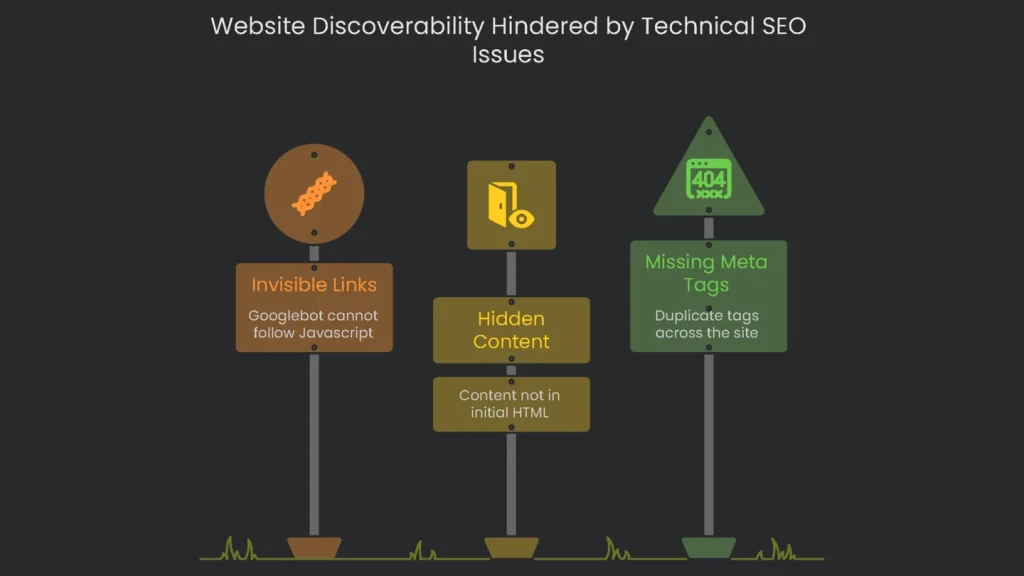
- Overview: Many apps lean on JavaScript tricks, like adding
onClickto a <div>, to move users around. The result looks slick but hides a big issue. Googlebot prefers real HTML and mostly discovers sites by following links it finds. When it doesn’t see an <a> tag, it can miss whole sections. - Fix it: Ensure all links that move users between pages are proper <a> tags. Each <a> should point to a clear, standalone URL. You can still use JavaScript for UI polish, but core crawler links must appear in the raw HTML.
Cool Stuff Eaten by Clicks
- The Problem: Designers hide info behind clicks—accordions, tabs, or “Load More” buttons. But Googlebot doesn’t click, tap, or hover. If info isn’t in the source code when the page finishes loading, it’s invisible and won’t be indexed. Valuable snippets, like product details or FAQs, can vanish.
- The Solution: Ensure required info appears in the HTML the instant the page finishes loading. You can hide it with CSS (for example,
margin:-9999px;) and reveal it with JavaScript after interaction. For long lists, avoid infinite scroll with a static URL. Instead, paginate with clear URLs like?page=2.
Missing Meta Tags
- The Problem: When an app runs only in the browser, the first HTML sent is often the same for every page. Consequently, key <head> tags—like <title> or <meta name=”description”>—are missing or duplicated across the site.
Implementation steps
- Review all routes to guarantee each URL delivers usable HTML from the server.
- Trim the JS bundle and cut large tasks; defer scripts that aren't mission-critical.
- Present content and linked URLs in HTML; steer clear of stuff that only appears on interaction.
- Let bots grab the CSS and JS they need; no blocking in robots.txt for those files.
- Check with the URL Inspection tool and a JS-ready crawler, and fix inconsistencies
Frequently Asked Questions
Can Google handle JavaScript?
Sure, but the rendering isn’t instant—put the vital stuff in server-sent HTML first.
What breaks JS SEO?
Blocked JS files, routes that only load in the browser, and content hidden behind clicks.
How do I test?
Look at the raw HTML versus the rendered version and check the coverage report for JS warnings.
What about Core Web Vitals?
Keep bundle sizes small, avoid long tasks, and tame third-party scripts to boost INP and LCP.
SSR, SSG, or pre-render?
Choose SSR or SSG, or a combo for both speed and dependable delivery.