
Rendering determines what search engines can view. Weigh SSR, CSR, and hybrid, then settle on a configuration that optimizes for indexability, speed, and resilience across frameworks.
How Websites Get Built
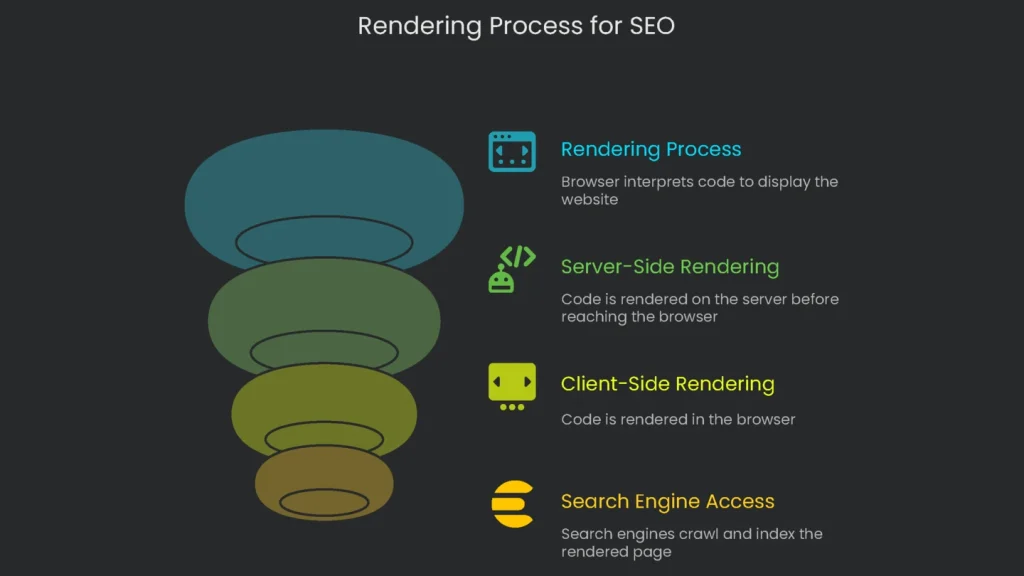
When it comes to technical SEO, everyone loves to brag about their keywords and backlinks. However, there’s a behind-the-scenes move called rendering that affects whether anybody even sees those keywords in the first place. Rendering is the browser’s quiet magic that tells a website how to appear. Get this process right, and search engines get a clear map of your content. Mess it up, and they end up lost.
A Flat-Pack Furniture Story
Picture the code for your site as a giant IKEA assembly guide. Rendering is the moment when the browser, with its CPU and memory, turns those instructions into something you can click and scroll. Where that assembly happens is the choice that matters most. Is the kid caching instructions in the server’s shop? That’s server-side rendering. Is the kid flipping each PDF page in Mom’s browser? That’s client-side rendering. In short, giving search engines a finished chair instead of a box of parts can swing your SEO outcome fast.
Why Rendering Matters for SEO
Rendering converts the code you build into the finished page that users and search engines load. If this step drags or breaks, even strong content can slip past search engines. Developers write HTML, JavaScript, and CSS. Yet search engines only see the page once that code is fully loaded and processed. Therefore, rendering can be a weak link.
When it’s sluggish or messy, the finished page never gets to shine, and the site feels broken. Rendering isn’t a nice-to-have boost; it’s vital plumbing for Google, Bing, and other bots. If a page is slow to render, to a search engine it’s like a door that won’t open. Consequently, fixing this step so bots enter smoothly is the floor the entire SEO house sits on.
Two Key Rendering Models
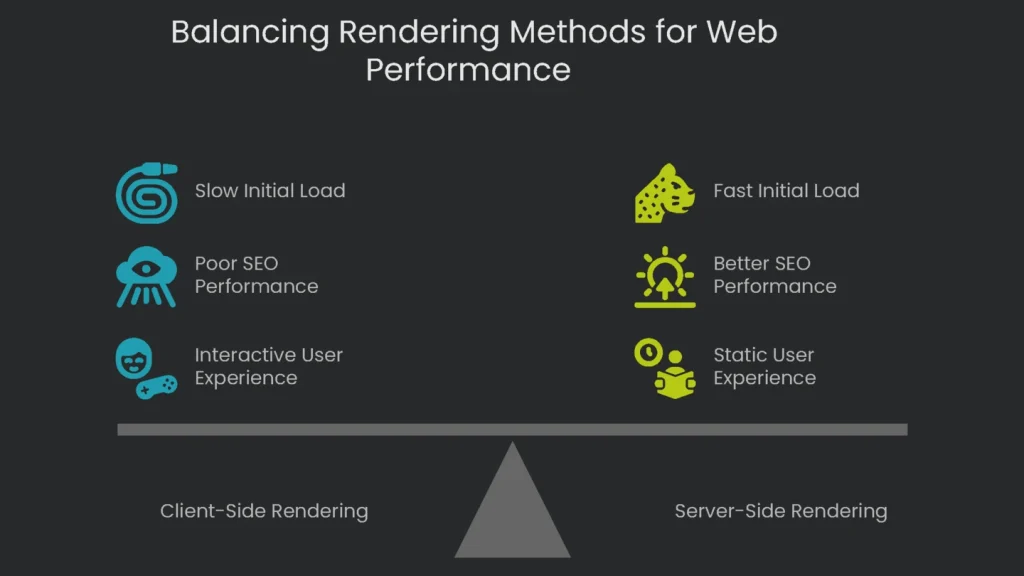
In this section we compare the two rendering setups using an IKEA delivery as a simple guide. Therefore, you can see the differences and how they influence search performance.
Client-Side Rendering (CSR)
Check out the deepest guides on this topic and you’ll spot CSR as the star of many flashy web apps. However, it promises interactive experiences after an initial loading bar, and that same loading bar can hide the page from search engine bots.
How CSR Works
Picture it: you order an entire IKEA room and all that shows up is one enormous, unmarked box. This box of raw wood, screws, and instructions is what the server ships. The browser, like you, must unpack and assemble everything before you see the finished Living Room Set.
If assembly is quick, you see a gleaming room on time. If it stalls, the search engine only sees an unmarked, incomplete box and leaves thinking the site is empty. As a result, indexing lags and visibility suffers.
- The Delivery: A web server sends a tiny, almost-empty HTML document—the “frame” for a page—with a few script tags. Alongside, a hefty JavaScript file arrives, packed with assembly directions and page pieces.
- The Assembly: The browser (the “client”) takes charge. It downloads and runs that big JavaScript file. Next, it grabs data, shapes HTML, adds layout, and finally paints the page onto the screen.
- The User Experience: This setup powers Single-Page Applications built with React and Vue. Once the first big load completes, clicking around feels snappy. However, the first load often takes a moment, leaving people staring at a blank screen or spinner.
The SEO Problem with CSR
Search engines run into trouble with Client-Side Rendering. Since the first thing robots see is that blank “box,” they must jump through extra hoops, then wait to fetch JavaScript and let the page load. As a result, they may miss parts of the content and rank the page lower.
- When Googlebot visits an SPA for the first time, it grabs the same small HTML file a normal user sees. It often finds an “empty box”—no main text, no internal links, and none of the SEO elements, like title and meta tags, developers expect.
- To cope, Google generally relies on a “two-waves” system.
- Wave 1 (Crawling): During the first wave, Googlebot skims the initial HTML and saves whatever it finds. It notices JavaScript and bumps the page up the list for a full render later.
- Wave 2 (Rendering): Later, when there’s spare capacity, a system called Web Rendering Service—basically headless Chrome—reloads the page, processes JavaScript, and indexes the complete HTML.
- The second wave doesn’t happen on the spot because rendering the web’s JavaScript is expensive. Different sites wait different amounts of time.
- A Vercel review of more than 37,000 pages showed the average time before anything appears is about 10 seconds. Shockingly, the slowest 10% hovered around 3 hours, while the worst 1% kept visitors and crawlers looking at a blank screen for about 18 hours. That’s time burned while everyone waits.
- A test by Onely illustrated the bottleneck: Google spent almost nine times longer crawling JavaScript-heavy pages than when a simple HTML link was used. To be exact, 313 hours for the JavaScript links and 36 hours when HTML was served directly. Consequently, the delay multiplies through each crawl pass.
- The actual delay depends on Google’s resources at the time and how important it judges the page to be, turning each crawl into a small lottery.
How CSR Stymies SEO from Page One
The rendering lag isn’t just a slow index date; it starts a domino effect. One delay tilts the whole rank board. Worse, it forces the algorithm to chip away at signals that don’t resolve fast.
The content doesn’t exist—yet. The API’s first hit never gets indexed on day one because the natural HTML is empty. A crawler lands and the first byte looks like a fallback 404. Therefore, an SEO red flag appears, and the page must be revisited later.
Discovery slows down. If internal links load via JavaScript, Googlebot misses them on the first try. The Onely test showed it clearly: unrendered links are skipped, so other pages get discovered late.
Crawl budget is wasted. When Googlebot retraces its steps, it eats into the crawl budget. First, it visits the URL blindly. Next, it returns to render everything. That second, full render is the pricier trip. Consequently, new content waits while the bot double-checks old pages, which stalls indexing.
Failure Stacking: Why Client-Side Rendering Breaks
When pages rely on big bundles of client-side JavaScript, more things can fail. If a key JS file is blocked by robots.txt, fails to download, or contains an error, the page can fall flat. Instead of content, Googlebot hits the empty box and indexes a page with little text.
The same snag can hide critical tags like the canonical link. When a canonical is added in JavaScript, Google won’t see it until a second pass. As a result, the page can sit in the wrong index for weeks. Plain and simple, moving important public content to the client introduces slowdowns and brittle failures.
Server-Side Rendering (SSR)
Server-Side Rendering (SSR) takes the classic way to serve pages and turbocharges it for modern needs. It hands visitors and robots a full, content-packed page on the first request. Therefore, it avoids many SEO headaches of CSR.
What Happens in Server-Side Rendering
With SSR, the server does the heavy lifting first.
- Assembly on Demand: When a request comes in—visitor or crawler—the server springs into action. It runs JavaScript, grabs data, and stitches the complete HTML page in real time, then hands it off in one bundle.
- The Delivery: Once markup is ready, the server sends the completed HTML. The browser immediately receives a fully ready page it can show without waiting.
- Adding Interactivity (Hydration): After the page appears, the browser fetches JavaScript and starts it. This step, called hydration, attaches behavior to each HTML element. For example, buttons respond, forms reset, and accordions open.
- Common Use Cases: It powers platforms like WordPress and modern frameworks like Next.js and Angular Universal.
The SEO Benefits of SSR
SEO loves server rendering because it’s predictable and hassle-free. It skips the wobbly waiting of client rendering. Consequently, important content lands in the index fast.
- “What You See Is What You Get”: Google’s crawler hits an SSR page and sees the same HTML a human sees. All text, links, and meta tags are present on first bite.
- Bypassing the Bottleneck: The complete HTML arrives up front, so there’s no slow sequel. Therefore, there’s no long wait in the rendering queue. This speed helps fast-breaking news, flash sales, and other time-sensitive content.
- Performance and Crawlability: SSR boosts Time to First Byte (TTFB) and First Contentful Paint (FCP). Plus, link lists ship in the first HTML, so Googlebot can map the site quickly.
Other Rendering Tricks
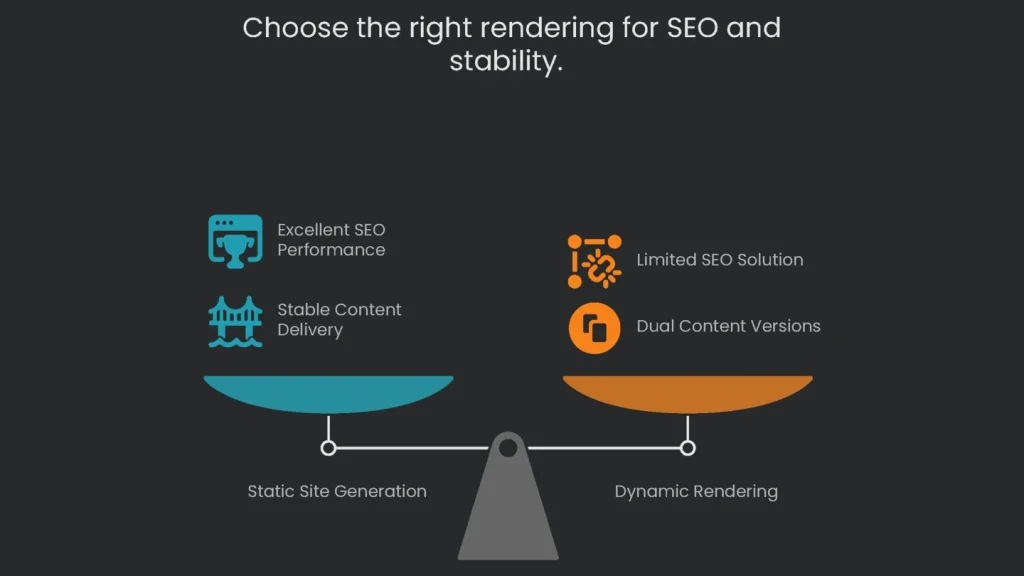
Besides CSR and SSR, developers often borrow the best bits from both. Therefore, they create practical hybrids that balance speed and freshness.
Static Site Generation (SSG)
Static Site Generation (SSG) speeds up page loads and stays dependable. Therefore, it wins on both stability and performance.
- What it does: Every page is baked into a plain HTML file during the build. That means pages are ready before anyone visits. The files sit on a web server or a global Content Delivery Network (CDN).
- Picture it: Factories crank out a thousand ready-to-use chairs. Warehouses in every city keep stock. As a result, the nearest dock ships instantly and nobody waits.
- SEO Impact: SSG is great for SEO and speed. Like SSR, it gives you a full HTML page that search engines love. It also wins on Time-To-First-Byte because the server sends a prebuilt page. For technical SEO, it’s a dependable and speedy choice.
- Best For: SSG fits sites where content changes rarely, like personal blogs, docs, and product landing pages. Popular tools include Hugo, Jekyll, and JavaScript options like Next.js and Gatsby.
Dynamic Rendering
Dynamic Rendering used to be the go-to for making CSR sites readable by search engines. However, its story has changed.
- Explanation: Dynamic Rendering checks who requests the page. A person gets the client-side version. Meanwhile, a crawler gets a fast HTML snapshot.
- Analogy: Imagine IKEA makes quick-check instructions for inspectors. The inspector sees the bare-bones version, but shoppers still get the full booklet.
- When it comes to SEO, it may look like a quick fix, but don’t ignore Google’s latest view. They treat it as a limited, short-term patch. For future-proofing, choose SSR or SSG so both visitors and bots see the same full content. Additionally, juggling two versions adds moving parts you must maintain.
A Quick Decision-Making Cheatsheet
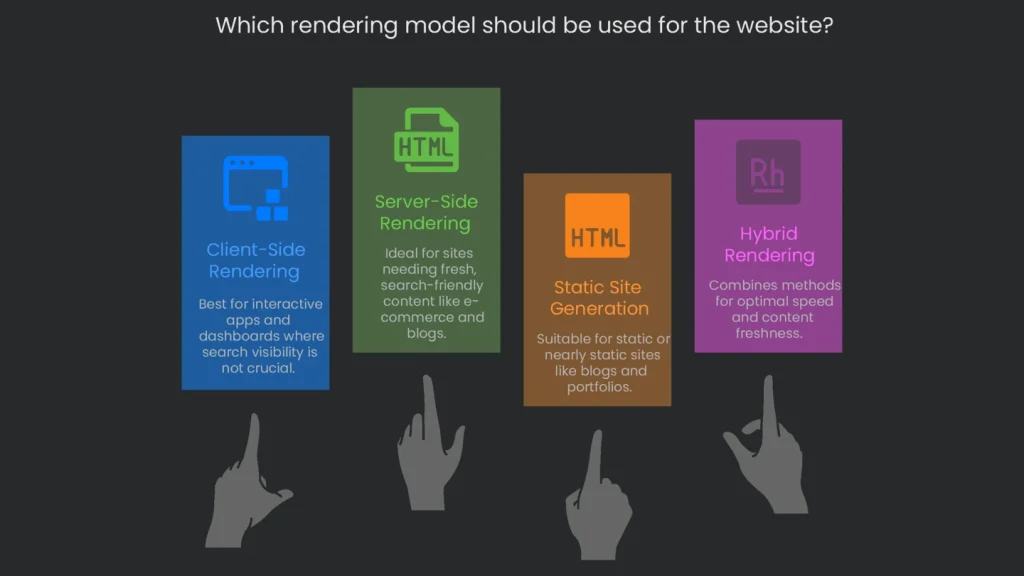
Knowing the why is helpful, yet shipping to production is what counts. Therefore, use this quick guide to kickstart conversations with developers on the best rendering choice.
Rendering Model Head-to-Head
This snapshot lays out the pros and cons of the main approaches, tying each technical fact to business goals.
| Feature/Goal | Client-Side Rendering (CSR) | Server-Side Rendering (SSR) | Static Site Generation (SSG) |
| How It Works | Browser assembles the page with a JavaScript bundle. | Server generates the page and sends a full HTML document. | Every page is pre-built and served as static HTML. |
| Initial Load | Slowest (user sees a blank page or spinner for a moment) | Fast (content appears nearly instantly) | Fastest (full content is delivered right away) |
| SEO Impact | Poor to Fair (indexing may lag, risking a dump of mostly blank content) | Excellent (crawlers get all content the moment they see the page) | Excellent (crawlers and users both see completed pages immediately) |
| Best For… | Interactive apps, dashboards, and portals requiring logins (where search visibility isn’t vital). | Sites relying on fresh, search-friendly content, like e-commerce, blogs, or news. | Static or nearly static sites, like blogs and portfolios. |
| Server Load | Low (most work shifts to users’ devices). | High (each request triggers a fresh render). | Very Low (CDN can cache and deliver quickly). |
Hybrid Rendering Models
You don’t have to pick one method forever. Frameworks like Next.js and Angular let you mix and match. A marketing homepage can use static generation, a product page can use server rendering, and a private dashboard can run in the browser. Consequently, this smart mix gives teams speed and fresh content.
Conclusion: The Key to SEO Success
Key Takeaways
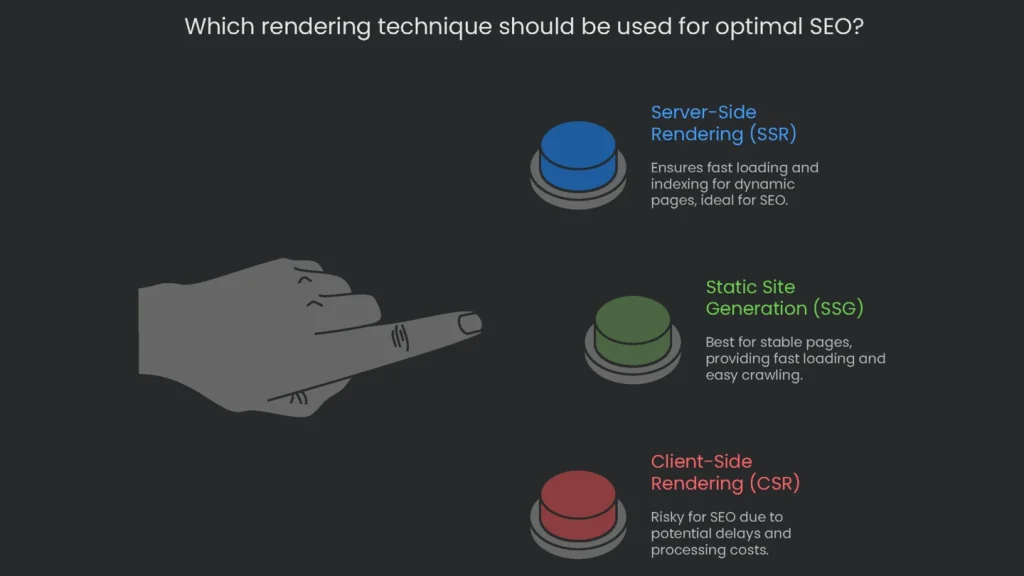
How you build a site shapes how visible it is to search engines. For a modern, JavaScript-driven app that needs organic traffic, choosing the right rendering pattern is a must. Google’s crawlers read client-side JavaScript better today, but delays and bottlenecks still exist. The company maintains a queue for rendering scripts, which signals heavy processing costs. Therefore, server-side rendering (SSR) for dynamic pages and static site generation (SSG) for stable pages are the safest paths to fast loading, crawling, and indexing. Relying on client-side rendering (CSR) for pages you want indexed is a risk that rarely pays off.
Why It Matters to Your Business
Modern JavaScript frameworks can act like a maze for search engines. Consequently, picking the right rendering technique isn’t just a code debate—it’s a business call that touches revenue and growth. Moreover, SSR, CSR, and SSG each tell a different story to both crawlers and browsers.
How We Help
At Technicalseoservice, we make that story a winning one. Our team evaluates your current rendering setup, uncovers JavaScript indexing gaps, and partners with your devs to apply the right solution, whether you’re on React, Angular, or Next.js. Finally, we provide hands-on expertise to ensure every page is friendly to visitors and to search engine crawlers alike.
Implementation steps
- Compare the raw server HTML to the rendered version with a URL Inspection or a headless crawler to spot any missing resource or broken link.
- Keep essential content in the server HTML with Server-side Rendering, Static Generation, or Incremental Static Generation, and let JavaScript extras load after that.
- Don’t block the JavaScript and CSS that your site needs to render; let everything load for the crawler.
- Every path should send a 200 HTML file and not a JavaScript-only page. No adapter pages only meant for a client.
- Run your performance tests and Core Web Vitals checks again to make sure what the crawler sees matches the rendered page
Frequently Asked Questions
What is SSR vs. CSR?
SSR makes the full HTML page on the server first, while CSR waits for the browser to run JavaScript and build the page.
Which is better for SEO?
SSR, or a mix of static and incremental static (1SR/SSG), makes sure search engines see the main content fast without heavy JavaScript loads.
Does Google render JavaScript?
Yes, but it may run those scripts later; any vital content should be in the HTML first.
How do I test rendering?
Open URL Inspection, check the rendered view, and see the HTML side-by-side with the original; don’t miss loading any required files.
Is dynamic rendering still recommended?
Modern SSR or SSG is better; dynamic rendering is a backup for rare situations that still need it.