
Add a strong protection layer with headers like CSP, HSTS, and X-Frame-Options, including to upgrade-insecure-requests, to shield users and maintain page usability over HTTPS.
Picture your website as a cozy treehouse. You wouldn’t hang a flimsy curtain and call it “secure,” would you? That’s where HTTP security headers come into play, a toolkit most site owners forget to unpack. Even with HTTPS locking the driveway gate, you still want the fence, the security cameras, and the “No Trespassing” signs. These tiny bits of text tell the browser how to act, treating every page like a secret mission: “Only let it in if it belongs here.” Boom—the treehouse now has invisible moat and drawbridge rolls up. You just fortified it against annoying pests like XSS, clickjacking, and nasty scripts.
How works?
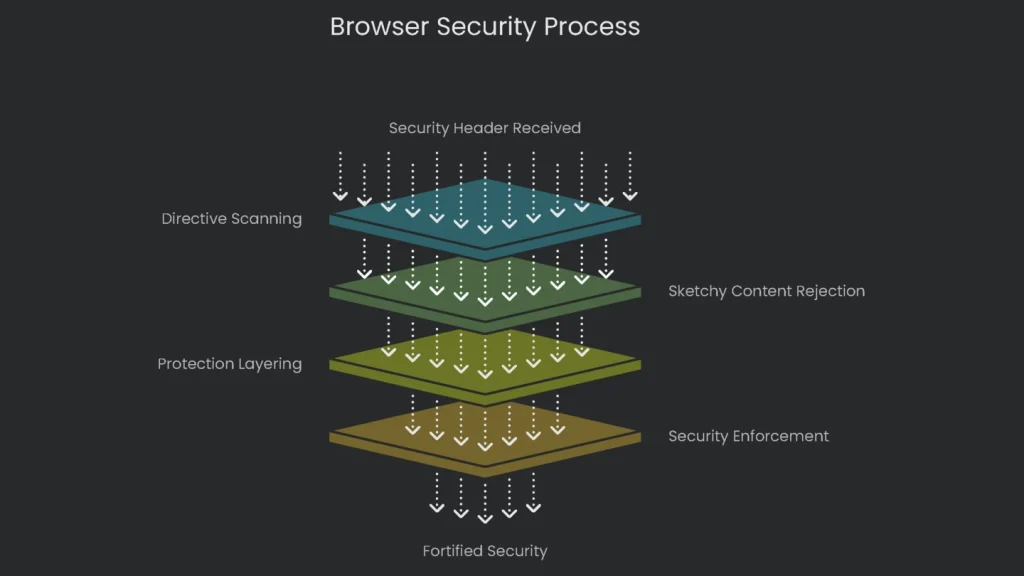
Here’s the thing: the moment your server hands the browser a security header, it scans the directives like a list of trusted friends. The browser keeps the invitation handy, and anything sketchy gets kicked off the guest list before it even reaches the treehouse. It’s like leaving your tough auntie in charge of gate duty; if someone doesn’t look nice enough, nope—they’re off the property. When you fine-tune these directives, extra protection layers stack on. An attacker starts to look for open windows, and instead they find only an angry security dog and a moat of flaming torches. Your code stays cozy, your visitors stay happy, and you just created a fortified treehouse without breaking a sweat.
This is like setting invisible rules for all your online visitors. Think of putting up KEEP OUT signs before a possible burglar shows up. Rather than waiting for a menace to ring your digital doorbell—like a security guard rushing to the front the second a siren blares—you’re locking down the place from the inside. You tell Chrome or Firefox to outright refuse to load any sneaky JavaScript from random corners of the web, or to never let your users enter through a cracked-open, non-HTTPS half-door. By doing so, you slam shut not just one faulty window, but an entire row of them, long before a hacker pulls up in a van outside. The end result is a moat, drawbridge, and pointed roof artillery all rolled into the server instructions, keeping the bad guys out without you needing to lift a finger each time.
The SEO Connection: A Subtle Superpower
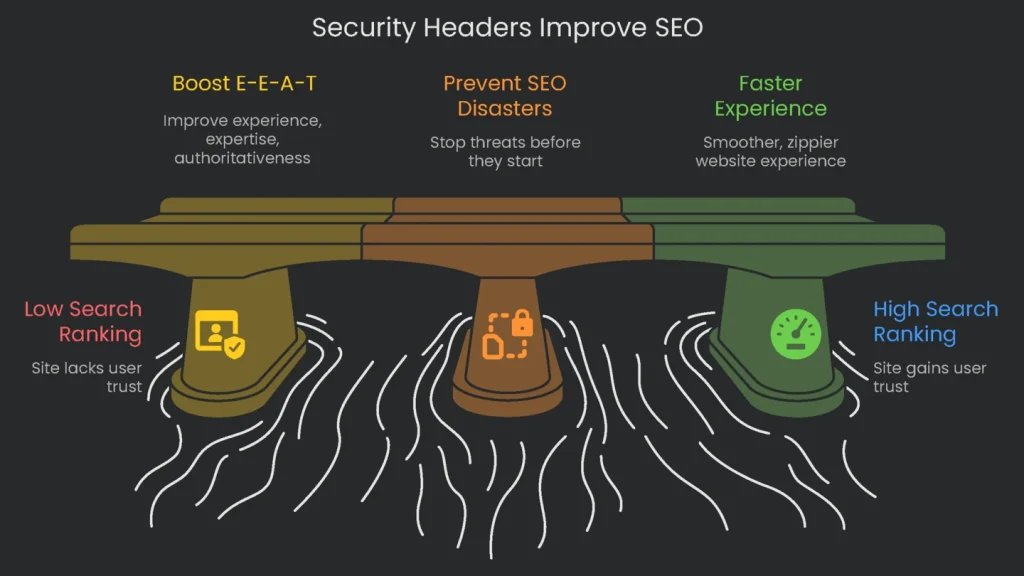
Let’s clear up the biggest myth: slapping on security headers won’t magically skyrocket your site to the top of Google’s results. You won’t find an applause medal for the pure beauty of your Content-Security-Policy. Dead-on, the link to search ranking is subtle and sneaky, like a double agent. The perks show up in traffic-boosting ways that don’t add a single header gift-wrapped for crawlers. You create a trustworthy vibe, sidestep public disasters that scare off visitors, and keep browsers running smoothly so users don’t view spinning icons and wonder if the site is haunted.
Boosting E-E-A-T and Trust
Google’s E-E-A-T—which stands for Experience, Expertise, Authoritativeness, and Trustworthiness—directs its bots on what really counts for users, and the trust part acts like glue for the whole thing. Google is clear: a secure site wraps visitors in a protective trust blanket. Now let’s see how solid security boosts each piece of the E-E-A-T puzzle:
- Experience: When users land on your site, how it feels is key. When a site is backed by strong security commands, the journey becomes smoother and safer. Take a well-tuned Content Security Policy (CSP) as an example: it blocks nasty ads and pop-ups that hijack pages—one of the biggest user turn-offs. Add in the HSTS header, and you get a little speed boost that makes the site feel snappier. A great experience keeps visitors on the page longer, lowers bounce rates, and all that signals search engines the site is worth their trust.
- Expertise: Rolling out security measures like the right headers and settings shows real know-how. It signals that site owners know the latest web standards and can handle server management and security. When visitors see a site operating smoothly behind a well-fortified wall, they notice the extra polish. This technical know-how sets professionally managed sites apart from the DIY ones that might be missing important safeguards.
- Authoritativeness: An authoritative source is one you can trust to stay correct and up. If a website gets hacked a lot, gets ugly banners slapped on it, or vanishes every time it gets a security break, people stop considering it a go-to authority. Security headers block those nasty break-ins, so your site stays up and looking sharp. By doing that, you protect your reputation and prove to the world that you’re the dependable site on the topic you cover.
- Trustworthiness: This is the first and biggest link in the chain. Trust is the foundation of the whole internet. When you carefully tuck in every single security header on your website, you send a message to visitors (and search engines) that you’re serious about keeping their data safe. It’s way beyond just flipping on HTTPS. Even if the ranking algorithm doesn’t name the Referrer-Policy header in its slide deck, those extras shine like a neon “We care” sign. Sites that use these headers the right way tend to get timed updates, real humans at the steering wheel, and designs built for user safety. Put those traits together, and you’ve got the user-centered, carefully crafted pages that Google really wants to lift. The route is straightforward: if the owner nails these technical touches, the site gains safety, speed, and a trail of happy visitors. Google reads that success story, spots the positive-pattern glow in user engagement, and the security-complaint ghost disappearing. Bit by bit, the ranking slowly edges a little higher, and the owner enjoys the outcomes of a safe path laid in the first decision.
Preventing SEO Disasters
Think of security headers as cloaking shields wrapped around your website that only adoring eyes can see. Their best feature is stopping threats before they can knock on your door. Picture this: one morning, you see that your website is showing yesterday’s news was hacked. Panic floods your brain, and all the late nights of work flash before you. Once the crooks stroll in, their favorite tricks are dumping spammy links, stitching phony pages, or planting invisible redirects that Google sees only. The SEO wrecking ball swings fast and hard:
- Google Penalties. The moment Google recognizes your site is serving hacked links, that’s a spam rule red flag. The result can be a manual penalty, meaning a real person at Google decided you’re contaminated. Your only choice is to scrub everything and beg the robots to look one more time. That means the site may stay docked and waiting for its lift for pages, internal links, and visits to go back. Sometimes the algorithm drops a penalty on its own, and your page drops like spent fireworks on search.
- BLACKLISTING ALERT: Picture that awkward moment when Google decides, “Hey, that page is sketchy,” and sticks a giant “This site may be hacked” sticker on your link. Suddenly, your traffic nose-dives. Nobody’s going to risk a warning badge when they’ve got a dozen clean results to pick from. One tiny pop-up, and trust takes the highway out of town—bye, organic traffic.
- CLEANING UP & REBUILDING: Getting your site back to normal is a pity party of patching, cleaning, and proving to Google that you’ve learned your lesson. You’ll comb your code, seal that hole the crook used, then shout at a chat-bot to review the page. After business as usual, your brand is coated in grime. Shoppers who previously trusted you back away, and their habits change overnight. It’s a battle of weeks, maybe months, to patch that gap. Some places rank again, others quit the race, never to hit that traffic peak again.
When you think about adding those security headers, it’s less of a drudgy task and more of a booster shot for brand trust. Prep calls for a few scrolls and a couple of punch-ins, and the hour spent is peanuts next to the wild, wallet-wrecking invoice that beacons after a breach—boardroom calls, leaked loyalty points, and the sticky, gray Google-whelped “hacked” headline that echoes forever.
Creating a Smoother, Faster Experience
Toss the locks on and the whole website feels smooth and zippy: scrolls flick like fresh iPads, clicks pop like crisp packages. There’s a little warmth flickering in the URL bar, and that sparkle feeds shoppers extra confidence to stick around, retweet, and punch the giant “yes” on the checkout page. Drop-offs droop, hang time glows, and those relaxed stats are the secret scoreboard Google tallies under the hood, sliding the site up the rankings, almost like the good vibes themselves are promoting you.
Plus, one simple header called HSTS can drop an invisible red carpet that actually makes your whole web page load faster. Here’s how it works: the first time someone visits your site, their browser tries the less secure, kind-of-wobbly place called HTTP. Your server says, “No way—let me reroute you to the safe HTTPS.” That needed detour adds a slight, pausing beat of time. Instead of letting the browser waste time, the HSTS header steps in and says loudly, “Okay, for the next year, skip the HTTP creep and come straight to the HTTPS party.” The next time the same person types your URL, their browser leaps past that detour. It works like a shortcut painted in the browser’s mind, letting your site respond a fraction of a second sooner. The first hand-raise—they type the URL—arrives just a hair faster because you told the browser to be smart. That’s the kind of speed that makes users feel like your site knows them and is ready for them to smile.
A Practical Guide to Implementation
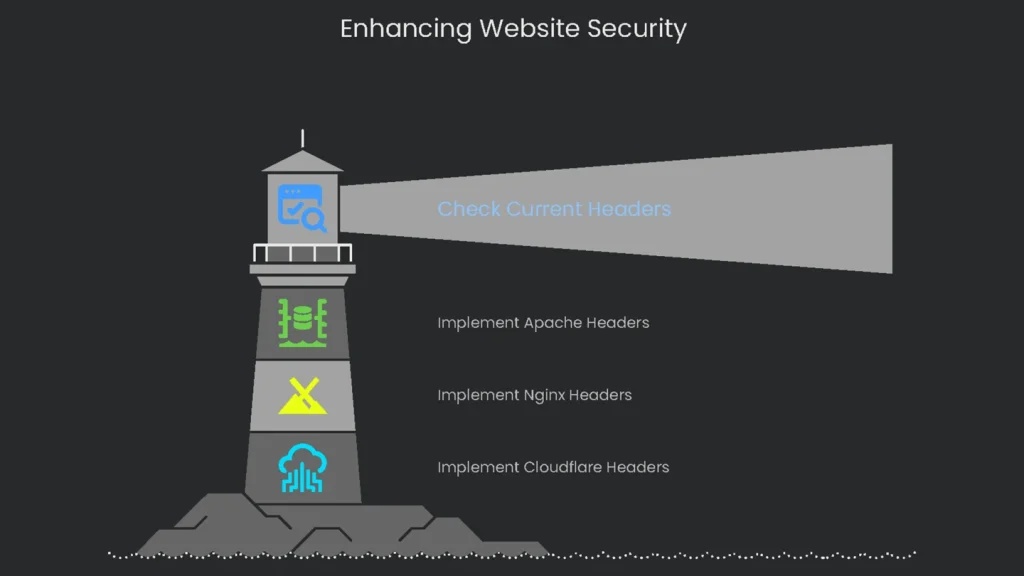
Okay, learning that the header is out there is great, but that’s just the shiny story. To actually unzip the speed is a little engineering. Here’s how to drop the header live.
How to Check Your Current Security Headers
Before you slap on any new header shiny badge you read about, you first need a snapshot of what your server already delivers. The check is quick, and you don’t need a fancy account. Pop over a free online header checker tool, drag and drop your URL, and you get a neat report. Already open and ready in the browser is the Dev Tools. Hit that F12 key, open the “Network” tab, reload your page, and right-click on the first item—pick “Headers.” Both paths show you exactly what, if any, upgrade journeys your visitors already dance through.
- Online Scanners: When you want an easy way to check your website security, hit up Scott Helme’s Security Headers tool. Type in your URL, get an instant score between F and A+, and see a clear chart showing which security headers are turned on and which you still need. This service is the place to start every time.
- Browser Developer Tools: If you want to check things live, open Chrome, Firefox, or Edge. Just right-click your site, choose “Inspect,” and switch to the “Network” tab. Reload the page, click on the first entry that shows your domain, and check the “Response Headers” part. You’ll see a raw list of the headers your server is sending right now.
Implementing Headers on Common Server Setups
Whether you’re on shared hosting or your own server, this is where you add the security headers. Pick the code that matches your setup and drop it in.
For Apache Servers (.htaccess file):
Apache
Header set Strict-Transport-Security "max-age=31536000; includeSubDomains" env=HTTPS
Header set X-Frame-Options "SAMEORIGIN"
Header set X-Content-Type-Options "nosniff"
Header set Referrer-Policy "strict-origin-when-cross-origin"
# Note: CSP is highly site-specific and requires careful crafting.
If you’re using Apache, slap this line in your .htaccess or site config:
Without breaking a sweat, drop this header line:
Apache
Header set Content-Security-Policy "default-src 'self';"
And that’s a wrap for Apache.
For Nginx Servers (nginx.conf):
Nginx fans, crack open your nginx.conf:
Stick these nifty lines inside your server block:
Nginx
add_header Strict-Transport-Security "max-age=31536000; includeSubDomains" always;
add_header X-Frame-Options "SAMEORIGIN" always;
add_header X-Content-Type-Options "nosniff" always;
add_header Referrer-Policy "strict-origin-when-cross-origin" always;
Keep in mind that Content Security Policy varies by site
Uncomment this header if you’ve already tuned it:
Nginx
add_header Content-Security-Policy "default-src 'self';" always;
For Cloudflare Users:
Cloudflare fans, chill out a sec:
Use “Transform Rules” to slap those headers in without breaking a sweat
Deep Dive into Key Security Headers
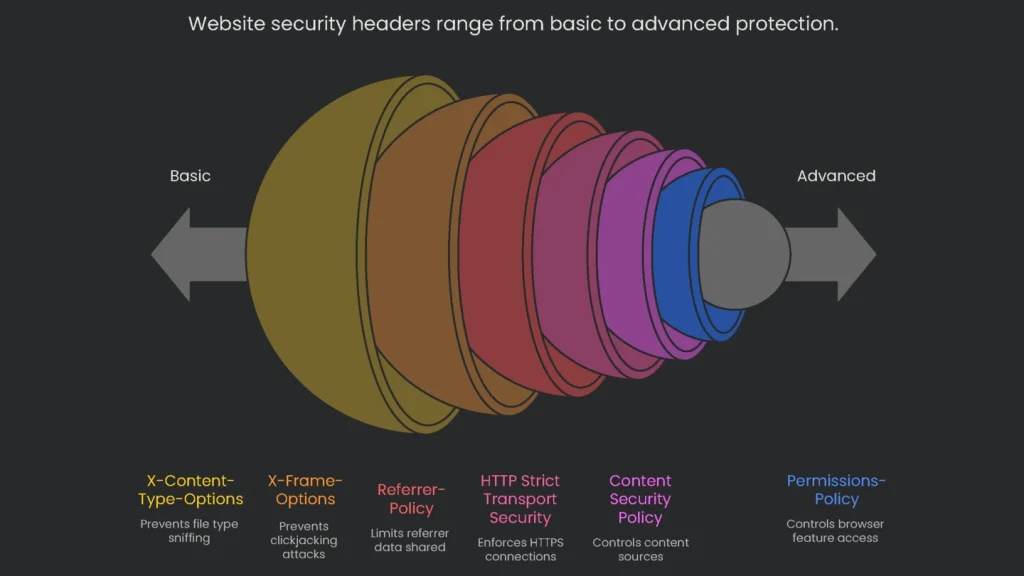
Let’s shine a spotlight on the headliners every site needs:
These response headers are like extra layers of armor for your page, patrolling browsers the moment the page loads. Here are the core picks, plus a crowd-pleasing value to kick off a challenge you won’t regret. Run through this list, make these headers neighbors in every response, and add ’em to your site’s security sprint-list.
| Header Name | Primary Purpose | Recommended Starting Value |
| Strict-Transport-Security | Forces the site to run safely over HTTPS. | max-age=31536000; includeSubDomains |
| Content-Security-Policy | Blocks unwanted external code. | (Site-specific; start with Content-Security-Policy-Report-Only) |
| X-Frame-Options | Stops your pages from being embedded to trick users. | SAMEORIGIN |
| Content-Security-Policy: frame-ancestors | Newer, stronger way to prevent framing. | 'self' or 'none' |
| X-Content-Type-Options | Guards against mistreated file type sniffs. | nosniff |
| Referrer-Policy | Limits data sent with links to other pages. | strict-origin-when-cross-origin |
HTTP Strict Transport Security (HSTS)
- What It Does: This header directs the browser to talk to your site only through HTTPS for the time you pick.
- Why It’s Useful: HSTS keeps you safe from sneaky man-in-the-middle attacks, which happen when someone on open Wi-Fi tricks your browser into switching your HTTPS request to plain HTTP. They grab the first request unencrypted, snatching cookies and downgrading your security. HSTS kicks in, the browser stores that you first visited securely, and every future request switches to HTTPS automatically. No unencrypted request gets sent, so the bad guy never sees any important data. Bonus: when HSTS starts, the browser ignores any security certificate warnings, nipping fake certificates in the bud.
Let’s break down a couple of really important security rules that websites can use to stay safer online. These rules are mostly tucked inside web code, but they make a big difference for anyone browsing.
HSTS Directives
- max-age: This tells the browser how long to remember that a site can only be visited securely over HTTPS. Usually, you see it set to 31,536,000 seconds— that’s one full year.
- includeSubDomains: Add this bit if you want the same HTTPS-only rule to apply to every little off-shoot of your site, like blog.example.com or shop.example.com.
- preload: This option is the heavy-duty one. When you use it, you can send your site to the official “preload” list, a kind of VIP access that major browsers pay attention to. This hard-codes the HTTPS-only rule, so the rule is baked right into the browser even before someone visits for the first time. Only slap this on if you’re 100% sure every single corner of your site and every subdomain can stay HTTPS-only forever.
Content Security Policy (CSP)
Here’s how it works: the CSP HTTP header is like a security guard giving visitors a super-detailed list of who’s allowed to deliver each kind of content on your page. Want to load a script? Only if the source is on the authorize list. Need a style sheet? It’s the same deal. Each type of content—scripts, styles, images—gets its own private rule, and if you’re not on the list, you’re turned away instantly.
- How CSP Saves You: A well-crafted CSP (Content Security Policy) is like that guardian standing ready every time someone tries to sneak a nasty JavaScript bit into your site. If that sneaky bit comes from a site not listed in your CSP, the browser just says, “Absolutely not,” and the code never runs. That keeps your visitors from the trouble of surprise pop-ups, stolen cookies, or any other nasty surprise the attacker planned. Their browser simply ignores the attacker’s code, and your users stroll away anonymous and safe.
- Start the Right Way: Content Security Policy rocks—but a wrong slip can take your whole site down. The safer way to kick it off is the
Content-Security-Policy-Report-Onlyheader. The browser looks at your rules yet keeps working—no blocks or blacks. Instead of simply tossing any blocked request, it sends a report to a URL you trust, letting you see what you’d have blocked. You study that to figure out what really needs allowance and what needs to be stopped. You clean it up in the log, and only when you see no red flags do you finally flip over to the stronger, fence-buildingContent-Security-Policyheader. - Frame Protection Tips: When pages load in a tiny bubble (the frame), they’re easy targets.
X-Frame-Optionsis the older header that tells the browser, “Please don’t load my site in a frame.” However, theframe-ancestorsdirective now lives in the CSP and gives you greater control. Withframe-ancestors, you can specify trusted URL lists and cover more ground in a single rule, keeping your page from possibly falling for clickjacking. The up-to-date shifts let you punch back at tricksters while staying flexible and relaxed with safe traffic. - Why You Should Care: Adding these simple HTTP headers stops a sneaky trick called Clickjacking. Imagine a hacker hiding a clear box over your real website. They show a fake page that reads “Click to win a prize,” but that box is secretly a button on your site waiting to delete your account or move your money. If someone clicks the prize page, they unwittingly click inside the box. Set
X-Frame-Options: SAMEORIGINorframe-ancestors: 'self', and the browser blocks any site from putting your page in a box unless that page comes from your domain. This stops the trick before the click happens.
More Shields You Should Use
- Referrer-Policy: This tells the browser how much information the user’s previous page should share when a link is clicked. Use
strict-origin-when-cross-originand it’ll only pass the domain and no specific page path, keeping users’ search terms and context from leaking to another site. - Permissions-Policy: This newer option controls what browser features, like the camera or location, can be shared. When you lock this down, you make it clear that no third-party code can listen in or track users without getting the green light first. A site that can effectively control its shared resources can protect its visitors a whole lot better.
- X-Content-Type-Options: Just a tiny header with just one rule:
nosniff. But it packs a punch. When the browser bumps into it, it won’t guess what kind of file it’s looking at. So, if a sneaky hacker tries to disguise a sneaky script as a harmless picture, the browser stands down, and the pretend-image goes straight to the trash.
The Future of Web Security
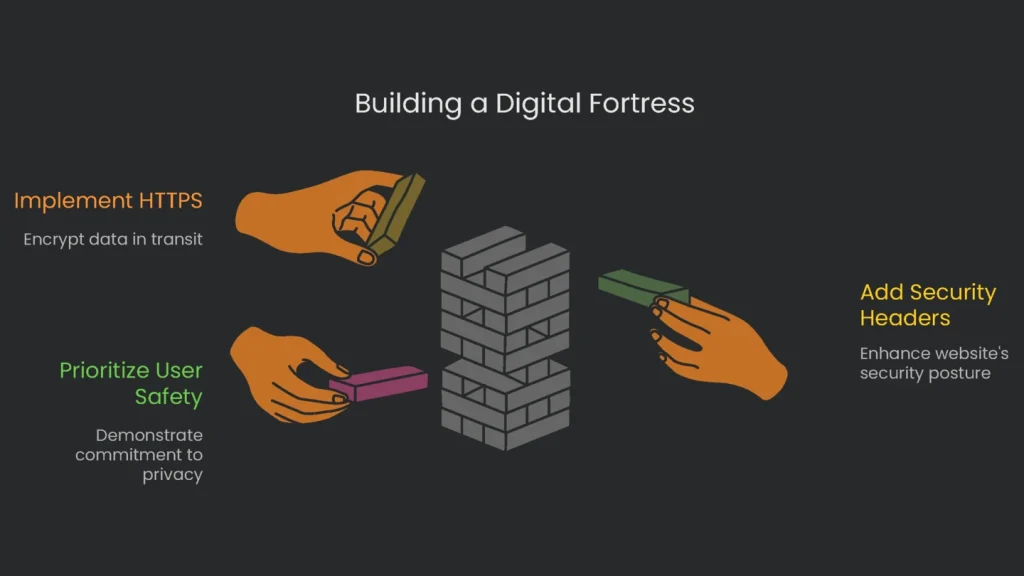
The Internet keeps changing, and security has to keep speed. These days the philosophy is “be safe, then let it work” instead of “hope it’s safe, and then let it work.” Years ago, HTTPS was a shiny add-on few sites bothered with. Today, letting users’ data sit in the open is practically malpractice. Right along with it, adding some solid security headers isn’t optional for a serious site anymore. It’s the bare minimum if you want anyone to trust you with their clicks and their data.
Turning on these security headers is way more than a quick technical check—it’s a badge of honor you wear for everyone online. You’re announcing to every visitor and every search engine that you care about their safety, that their privacy matters, and that you mean business in the online world. Search engines like Google are still getting smarter about user safety, and the signals they notice today—like these headers—will be the signals that define impressive, trustworthy sites in the near future. The effort you make right now to build a digital fortress isn’t a chore; it’s a forward-looking investment. Over time, that fortress will transform into a shining reputation, a dirt-free slate for users to rely on, and a long-lasting boost to your search visibility. The payoffs of hardening your site today arrive in trust, dependability, and steadily rising rankings for a long time.
Implementation steps
- Enable HSTS, X-Content-Type-Options, frame security, and tuned Referrer-Policy.
- Establish a Content-Security-Policy (begin with alerting only) and resolve flagged counts.
- Turn on upgrade-insecure-requests to clear mixed content warnings as pages load.
- Validate security headers in DevTools and as budget a step check on templates.
- Watch for slips, tighten guardrails seasonally, not all overnight
Frequently Asked Questions
Which headers matter most?
HSTS, CSP, X-Frame-Options, X-Content-Type-Options, and Referrer-Policy.
Do they help SEO?
Not directly, but improving security and user trust can boost engagement and conversions, and search engines notice.
How do I add them?
Set them at the server level, on a CDN, or through middleware.
Can headers fix mixed content?
A CSP directive to upgrade requests helps, but it’s best to change the links so they are all secure from the start.
How do I test them?
Use the Developer Tools in your browser and scanners like securityheaders.com.